Developer Experience and User Experience are two key considerations when shaping a product. Today, software products are no longer exclusively used by humans but also by AI agents. This shift requires a new lens to design your product: Agent Experience.
The term “Agent Experience (AX)” was first coined by Mathias Biilmann, Netlify’s CEO, in January 2025 as the “holistic experience AI agents will have as the user of a product or platform”.
I’ve spent the last three years working in Developer Growth and Developer Relations in the AI space and watched the playbook rewrite itself. I have been seeing a shift from how we think about SEO to how we consider how content gets mentioned in LLM responses, how we think about making documentation not only accessible to developers but also AI agents, and how we are starting to formulate engineering best practices around the ease of use for agents.
In this blog, I’ve put all the techniques I’ve come across so far into a practical framework. Note that the concept of Agent Experience is only a year old, and the industry is currently iterating on different ideas and techniques, which might already be outdated in a few months.
Agent Experience (AX) vs Developer Experience (DX) vs User Experience (UX)
Agents have entered the chat. Until now, software products have had two target audiences in mind when improving usability: End-users and developers. Now we have agents interacting with software products. Coding agents can build software using different software products, including databases or frameworks; Computer use agents can interact with different software products, including email or calendar apps on your behalf.
User Experience (UX) centers on how end-users successfully accomplish tasks with your product. Developer Experience (DX) focuses on how developers successfully build with your product.
Agent Experience (AX) is different: the “user” is an AI agent that discovers, evaluates, and operates your platform, often without a human in the loop. The central question becomes: How does an AI agent successfully use or build with your product? This also means the agent can be seen as both the end-user and a developer persona.
| User Experience (UX) | Developer Experience (DX) | Agent Experience (AX) | |
|---|---|---|---|
| Target audience | End-user | Developer | AI Agent |
| Focus | How to use the product | How to build with the product | How agents use and build with the product |
| Metric | CSAT, NPS, Task success rate, etc. | Time to first API call, Build speed, etc. | Picked by agents, token usage, number of feedback loops |
When designing for DX or UX, keeping the target audience’s emotions in mind is a key aspect: Are they frustrated, confused, delighted? For AI agents, this sentiment curve doesn’t exist. Instead, we have to replace emotions with failure modes (e.g., ambiguous error response, auth failure, etc.) and the sentiment curve with reliability curves (“How likely is the agent to succeed at each stage”).
Stages of the Agent Journey Map
Agent Experience has many different facets. Some aspects include answering questions like “How do you make an agent pick your software product?” or “How do you make your software product accessible for agents?”
This reminded me of a similar concept from UX and DX: In UX and DX, the target audience’s goals, questions, and answers are commonly mapped to so-called “user journey maps” or “developer journey maps”, which represent the end-to-end path the user or developer takes when interacting with your software product. In agent experience, the agent’s path is similar to the end-user’s or the developer’s, except that the human persona is now an AI agent.
In this section, I map the path an agent takes from discovery to success on an analogous “Agent Journey Map”. You can think of it as an adoption funnel for agents. The map I came up with follows the five stages of Discover, Evaluate, Onboard, Integrate, Advocate, as shown below.
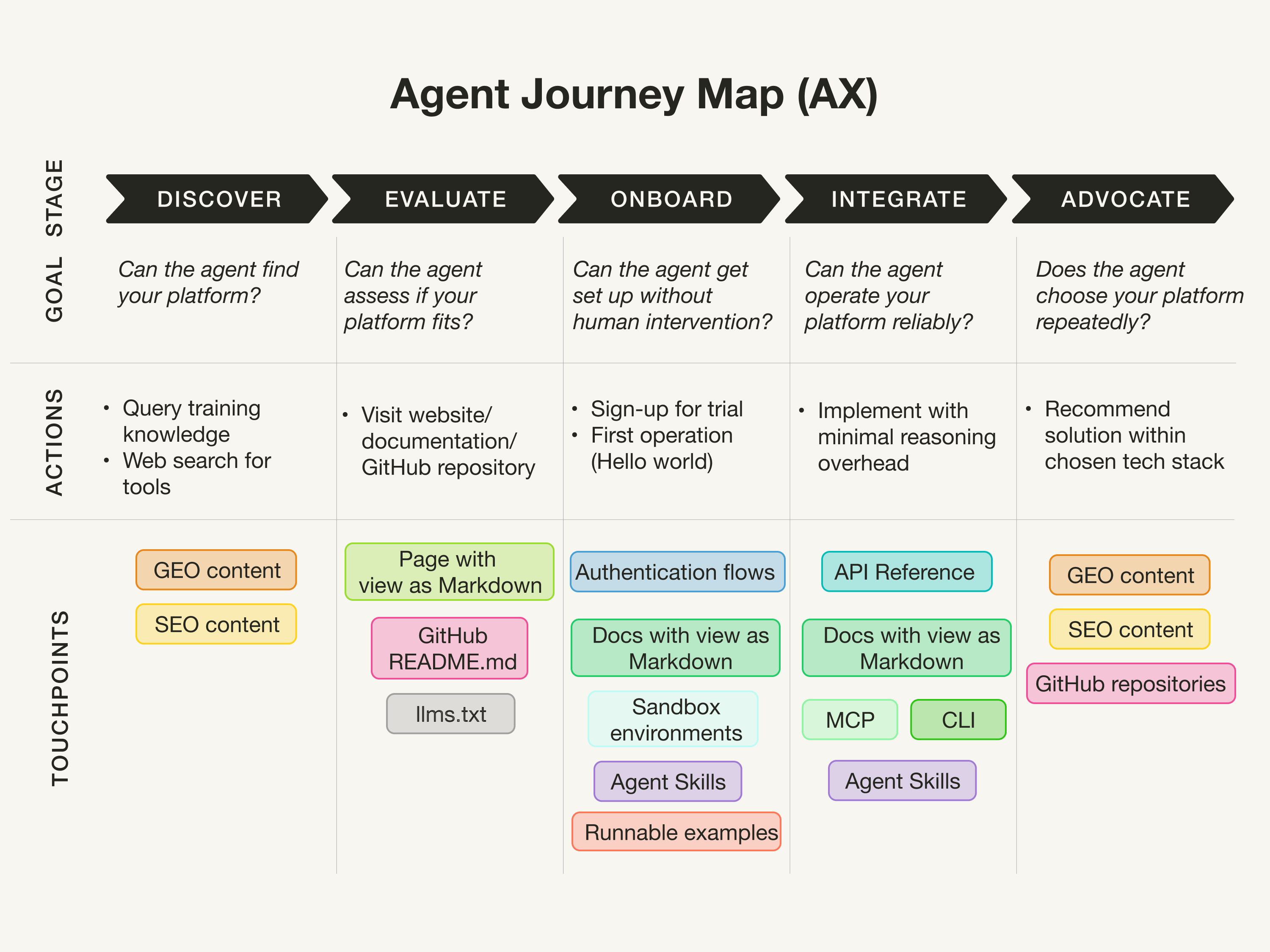 (Inspired by Developer Journey Map)
(Note that in DX, you often have a “Scale” stage between “Integrate” and “Advocate”, which I couldn’t figure out how to properly manage in the AX case. If you have an idea how to improve this, please reach out.)
Discover
The “Discover” stage tries to answer the question “Can the agent know about and find your platform?” This stage is about the visibility of your platform in LLM training data and search results when the agent calls web search tools for research.
This is the billion-dollar question. I have seen many agencies promising solutions to the discoverability and visibility for LLMs, but I haven’t seen any proof that they work.
A common assumption I see is to increase the volume of mentions of your product in the foundation models’ training data. There are also plenty of agencies popping up promising increased LLM citations by generating User Generated Content (UCG) for popular platforms, such as Medium or dev.to.
Another aspect is the SEO equivalent of getting mentioned in LLM responses, which goes by many different names, such as GEO (Generative Engine Optimization), LLMO (LLM Optimization), or AEO (Answer Engine Optimization). Many SEO tools incorporate GEO/LLMO/AEO into their product and promise better rankings by adjusting blog structures for skimmability and chunking, improved citations for proof of authority and relevance, and easy readability. However, I haven’t seen any confirmation on whether those actually impact mentions in LLMs.
Finally, considering how LLMs formulate search queries when using web search tools, the web is now flooded with low-quality SEO articles with titles, such as “Top 10”, “in 2026”, “X vs Y”, and so on for different tools.
Evaluate
The “Evaluate” stage tries to answer the question “Can the agent assess if your platform fits the task and meets its needs?” This, I’d say, is similar to how a user or developer would evaluate your product by browsing your website or documentation. Similar to UX and DX, your website should have clear capability descriptions. What’s new in AX is considering making websites more accessible to agents.
In September 2024, Answer.AI proposed the llms.txt file format as a standardized way to provide information to help LLMs use websites. While the industry has been promoting this standard as a best practice, from my experience, the llms.txt receives little traffic. A recent blog post by Dries Buytaert, founder of Drupal, reports the same, stating “The bots it was designed for don’t look for it.”
The same blog by Dries also observes that Markdown files get requested more than the llms.txt. Many companies, such as the Gemini API docs or the Elastic docs, now have “View Markdown” options. However, Dries’ blog also shows that Markdown files are viewed by bots, but not as much as the regular HTML files.
Onboard
The “Onboard” stage tries to answer the question “Can the agent get set up easily (without human intervention)?” This stage considers everything about the agent’s first access, including:
- “How fast can the agent get started?”: In Developer Experience, you’d measure this by a metric like “Time to Hello World” (or “Time to first token/first API call/etc.”). In Agent Experience, having an Agent Skill that guides the agent on how to successfully use an API can be helpful, aside from the regular documentation.
- “Can the agent get started without a human?”: Does the agent have the right permissions, or must a human be in the loop? For example, when registering on your platform to obtain an API key, maybe the authentication step is where agents most commonly fail because OAuth flows are designed for humans (in the loop). Another consideration is if your offering could benefit from a sandboxed environment.
Integrate
The “Integrate” stage tries to answer the question, “Can the agent operate your platform reliably?” Currently, I’m seeing four main ways an AI agent uses a software product:
CLIs are arguably the simplest interface for an agent to use because LLMs have been trained heavily on CLI usage.
APIs are the most established way for agents to interact with a software product. The key for AX is ensuring your API has clear, machine-readable specs (e.g., OpenAPI) and error responses that give the agent enough context to self-correct without human intervention. This is especially important when your tool is new and not yet in any LLM’s training data.
An interesting approach by HORNET.dev is to use verifiable APIs (including configuration, queries, and deployment) to let agents learn how to use their retrieval engine through guided feedback loops, analogous to code that can be tested and self-corrected.
Model Context Protocol (MCP) is an open standard for connecting LLMs with external tools and data sources proposed by Anthropic in 2024 and donated to the Linux Foundation at the end of 2025. Many companies now manage MCP servers that expose tools, up-to-date documentation, and code examples directly to agents via MCP clients. Although MCP promised a cleaner interface, a recent blog post argues that LLMs don’t need specialized protocols because they can figure things out on their own with a CLI and some documentation.
Agent Skills are reusable, self-contained instructions that guide an agent on how to successfully accomplish a specific task with your product. This is especially valuable during onboarding, but well-designed skills can reduce failure rates throughout the usage.
—–
Additionally, when I discuss best practices for writing tools for search agents with my colleagues at Elastic, they talk about “Low floor, high ceiling”: a concept from User Experience (UX) design that describes products that are easy to get started with (low floor) yet capable of supporting advanced, complex use cases (high ceiling). In the context of search agents, that means:
- Low floor: Make it easy and accessible for agents to solve repetitive tasks with little reasoning overhead by abstracting tasks into specialized tools. While this reduces the complexity for commonly known tasks, having access to only specialized tools will prevent the agent from solving ambiguous tasks.
- High ceiling: Enables an agent to solve complex, ambiguous tasks with general-purpose tools (such as all-purpose search tools or plain exec tools) even when there are no specialized tools available. However, as the agent has to figure out how to solve the task on its own, it might require more iterations to solve the problem.
Advocate
The “Advocate” stage tries to answer the question “Does the agent advocate for your platform?” For example, how do agents decide what software products and developer tools to recommend for a certain coding task? How does an agent pick their go-to tech stack?
A recent report presented an analysis of what Claude Code Actually Chooses. The report showcases that Claude Code seems to favor specific software products over others. The report highlighted the competitive intelligence of understanding what and how AI agents actually choose software tools.
Unfortunately, I don’t know how AI agents choose software tools. I can only assume that this might be related to the techniques in the “Discover” stage of the quantity and sentiment your product is mentioned in the training data, and what ranks high for specific web search queries the agent composes when researching. Additionally, I could imagine that the amount your product is used in public projects in GitHub repositories could play a role as well.
This question essentially loops back to the “Discover” stage, which makes the agent journey a cycle and not a funnel.
Summary
As AI agents establish themselves with use cases such as coding agents, considering Agent Experience when designing your software product becomes more important.
As we’ve seen, the industry proposes and experiments with different standards, such as the llms.txt or MCP, and already starts to discard them. All the aspects mentioned in this blog are a snapshot of the techniques practitioners are experimenting with right now and may be outdated in just a few months.
Whether you think “Agent Experience” is just another buzzword, the reality is that agents are now very real users of your product. If you are a big AI lab developing LLMs (which are the core part of an agent), Agent Experience might be less of a priority for you right now. However, if you have a developer tool or software product you want agents to use, Agent Experience should become a priority. People are already discussing whether Product-led growth (PLG) approaches will soon be replaced by “Agent-led growth” approaches.