This post is an edited long-form version of the workshop titled “Agentic Search for Context Engineering” I gave at AI Engineer Europe 2026 on April 8, 2026 in London. The slides, code, and diagrams are available in the workshop repository. If you prefer video, the full recording is available on YouTube:
If you’ve built an agent before, you know that context engineering is a cruical part of making an agent return meaningful responses.
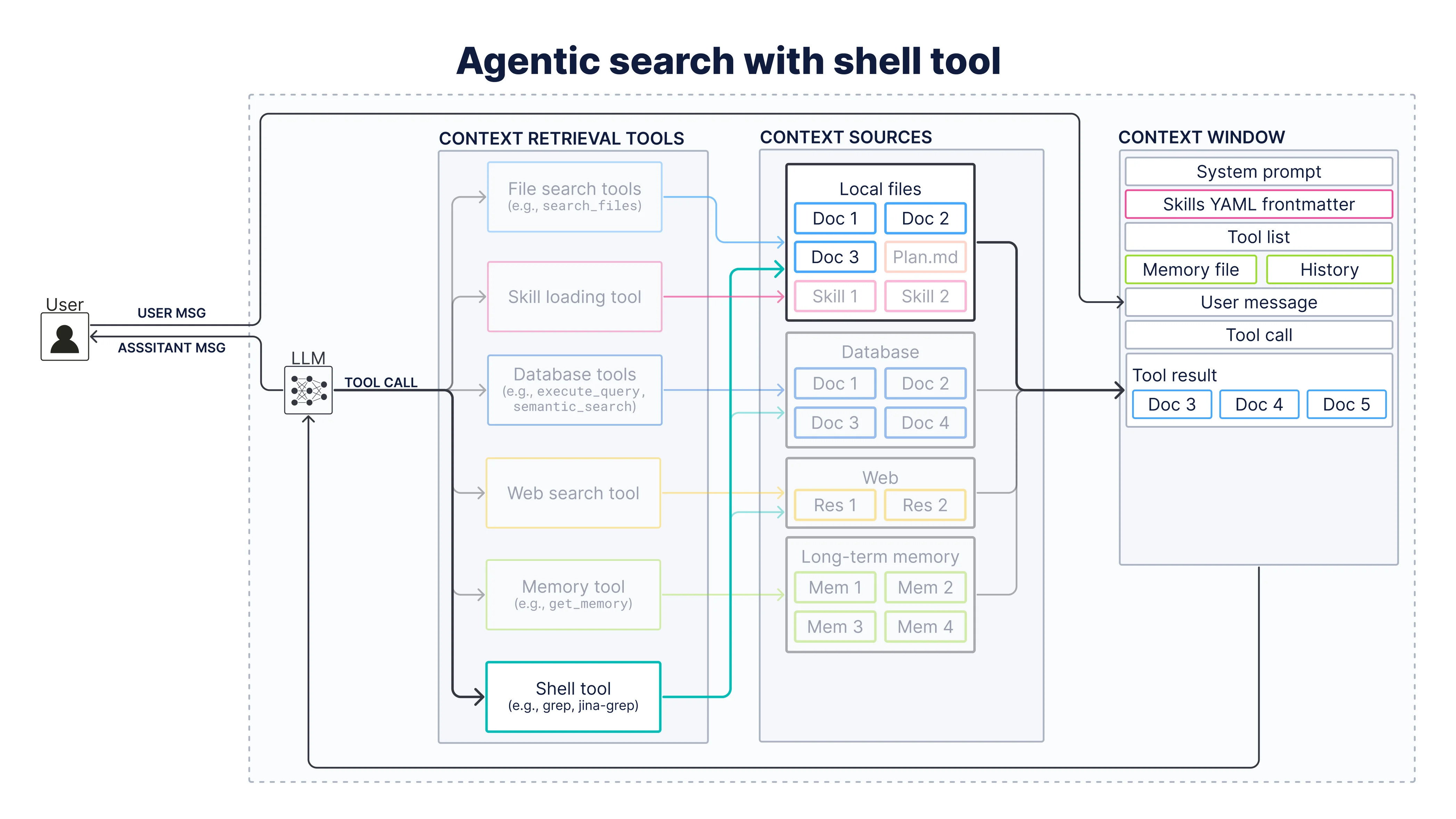
Context engineering is the process of deciding what from all possible context sources actually goes into the agent’s context window so the LLM can generate the best response. This is also referred to as the process of “context curation”, which is depicted as the arrow from the possible context sources to the context window in the diagram below.
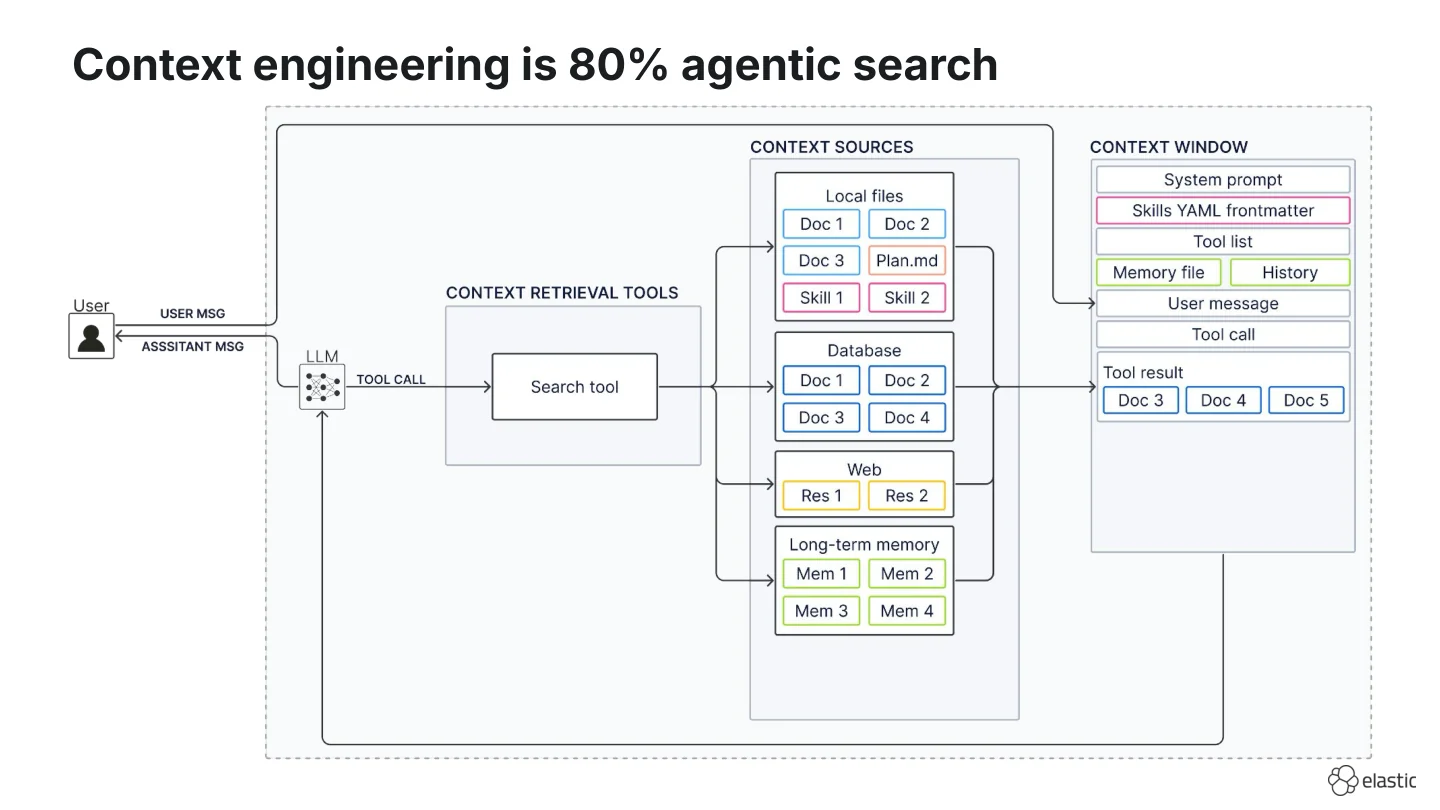
I think we don’t give this context curation arrow enough credit because it does almost all of the heavy lifting. What hides behind it is a set of search tools the agent can decide to use. That’s why my personal hot take is that:
Context engineering is about 80% agentic search.
History
Let’s take a step back and look at how search in the AI stack has evolved from Retrieval-Augmented Generated (RAG), to agentic search/agentic RAG, and now to context engineering in the last three years. (If you’re interested I’ve also written about the evolution from RAG to agent memory.)
Retrieval-Augmented Generation
When we first started building with LLMs in 2024, we started implementing RAG systems with fixed retrieval pipelines:
- The user message is used - more or less verbatim - as a search query (often vector search).
- Chunks are pulled from a database once.
- Retrieved chunks are combined with the user message in the prompt and fed to the LLM.
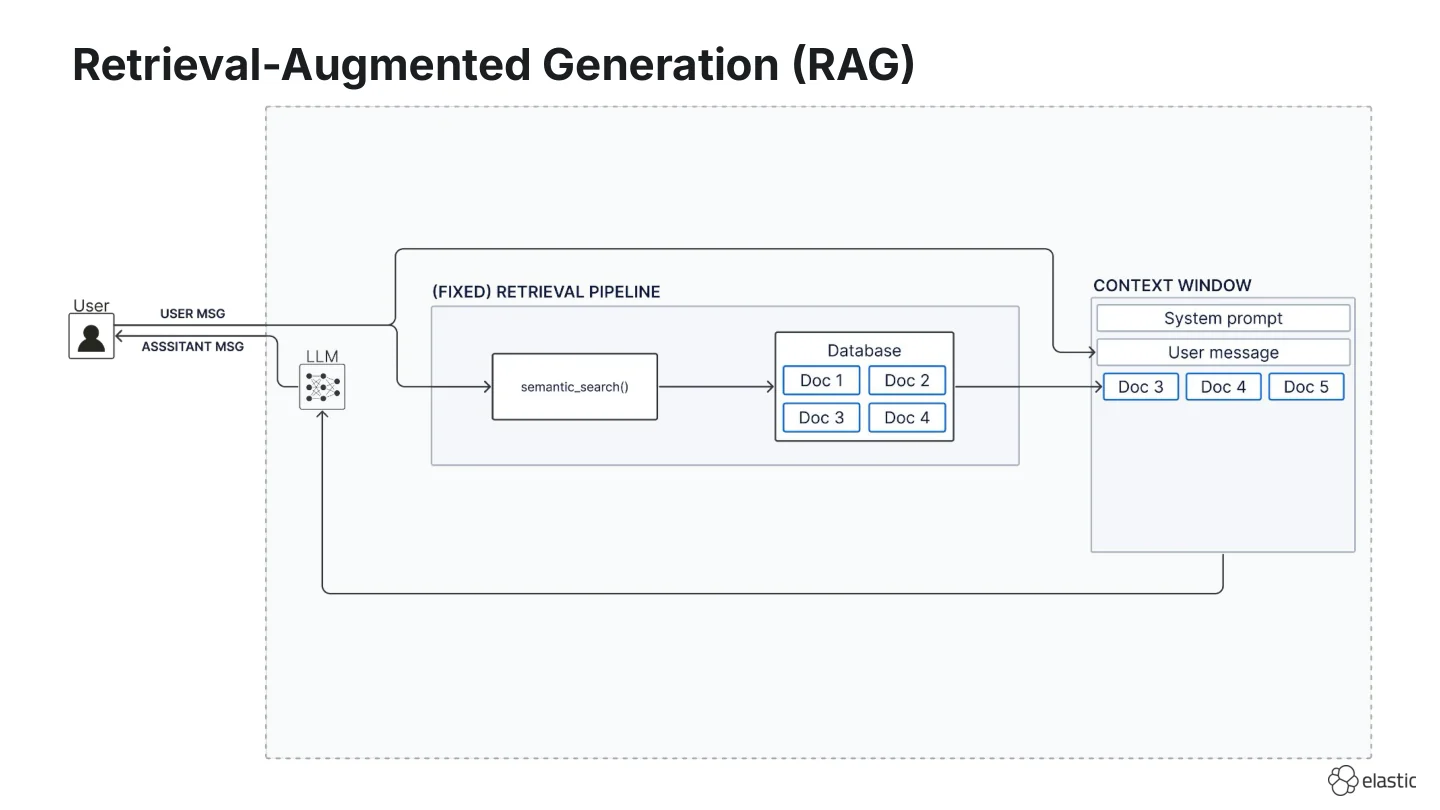
This design is straightforward and still works for narrow Q&A. But it also breaks in predictable ways because you retrieve exactly once:
- You retrieve once even when the model does not need external context, and irrelevant chunks can confuse it.
- You retrieve once and have no option to correct the query. What if the returned results don’t contain the relevant information and you’d need to run a second search?
- You retrieve once even when the question needs multi-hop retrieval. For example, the first batch of chunks might only tell you what to search for next, but the pipeline never runs a second pass.
Agentic RAG
To overcome these limitations, we replaced the fixed pipeline with a search tool and called it “agentic RAG”, “agentic retrieval”, or “agentic search”. In this scenario, the agent decides whether to call a search tool, whether results are relevant, whether to retrieve more, and whether to rewrite the search query.
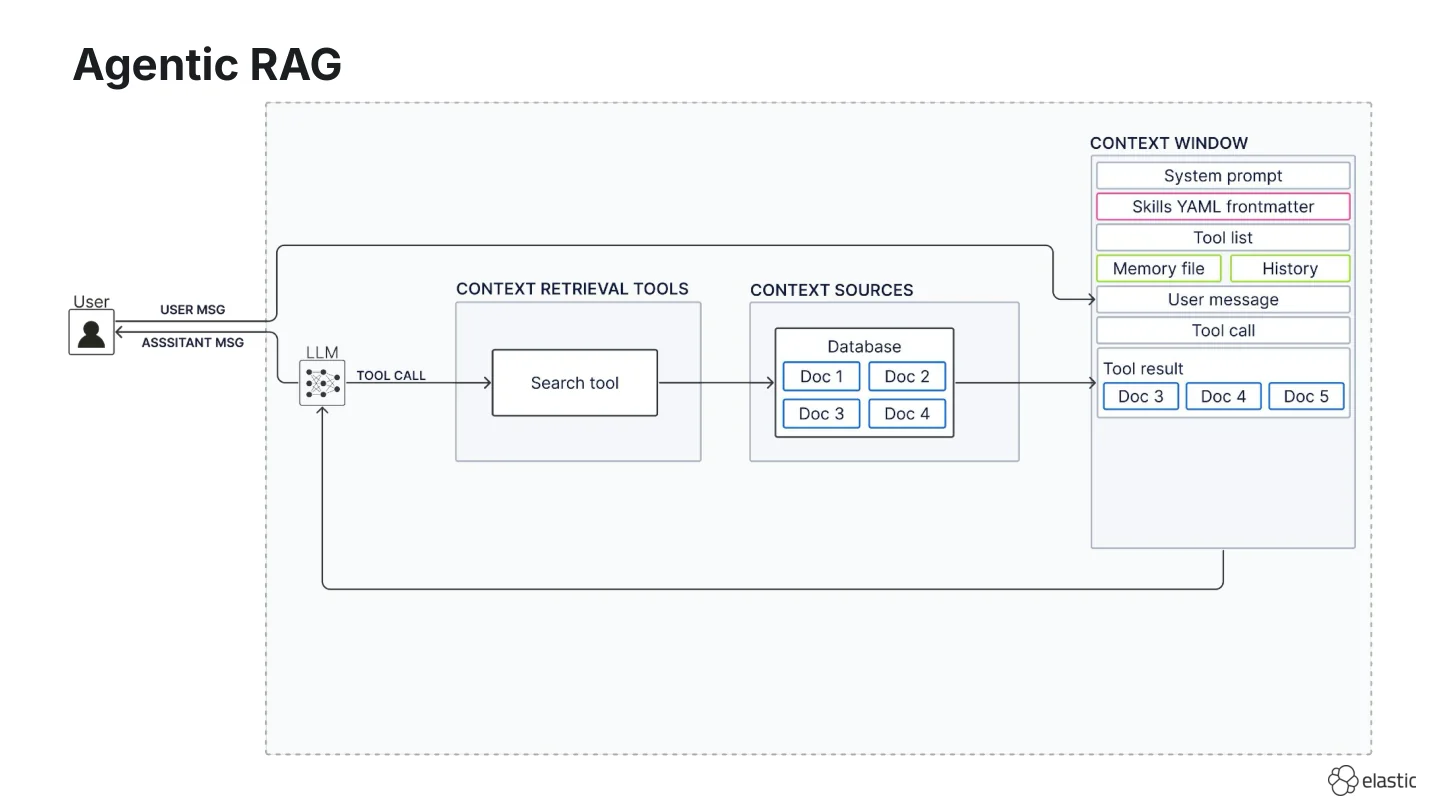
In many setups this is straightforward because you often have only one or at least a limited amount of context sources and one retrieval tool.
Context engineering
In context engineering we now have many different context sources:
- Local files (e.g., your repo, scratch pads with
plan.mdortodo.mdfiles, or Agent Skills) on disk, - Databases (e.g., storing large-scale enterprise data),
- Web,
- Long-term memory (I left this ambiguous on purpose because whether memory lives in files or a database is still debated)
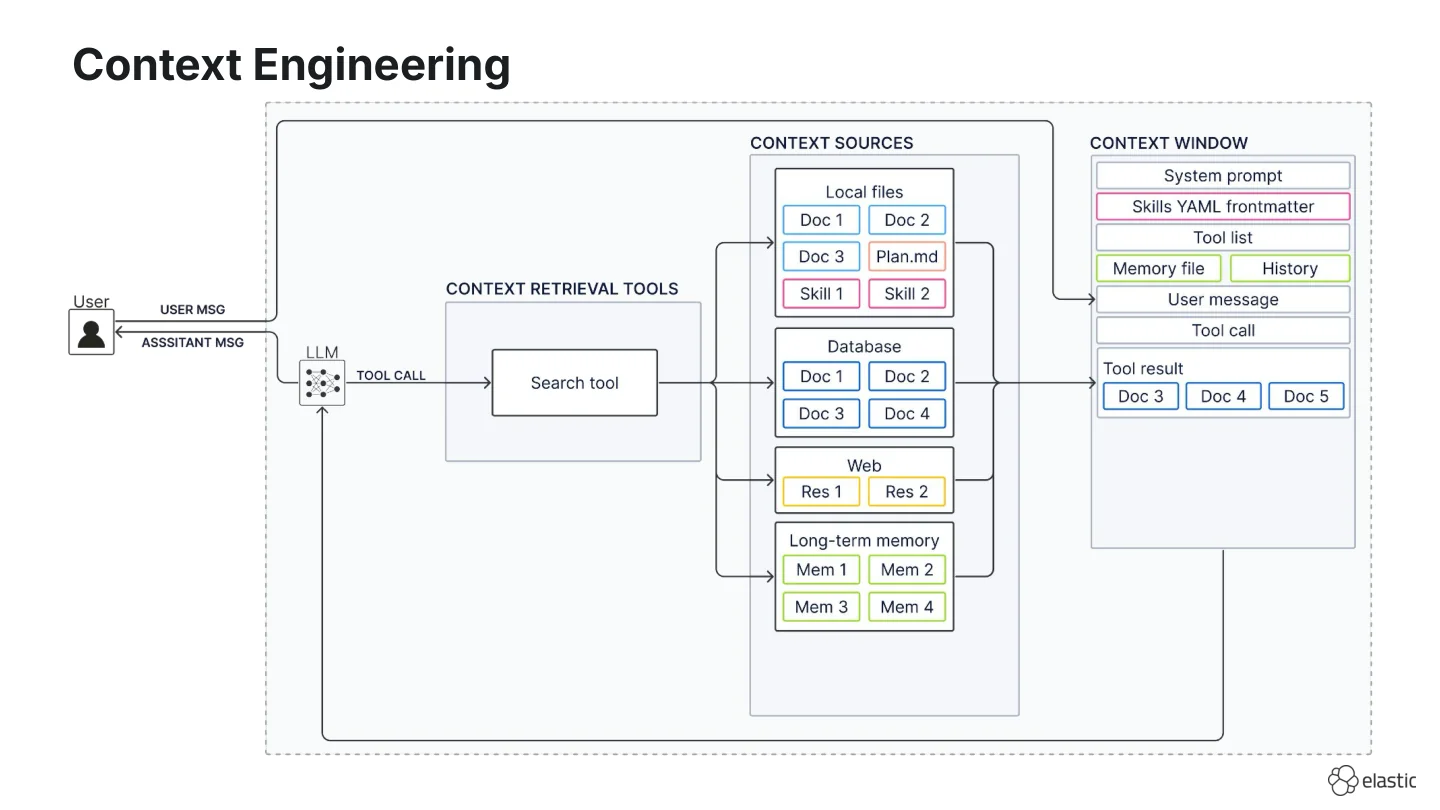
And depending on the context source, we often have a native search tool:
- file search for local files,
- skill loading for Agent Skills,
- dedicated database tools (semantic search or query execution) for databases,
- web search for the web, and
- memory tools for long-term memory.
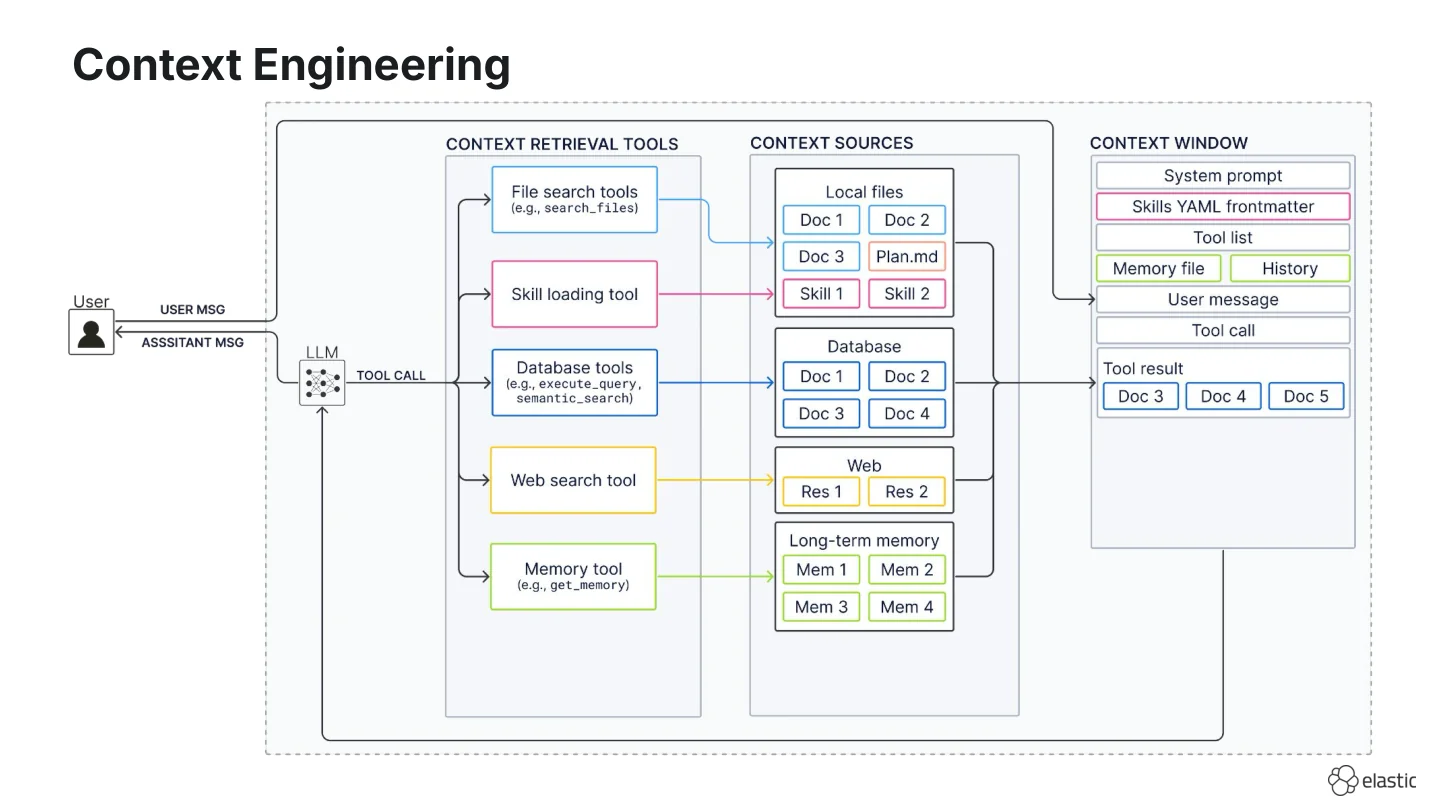
If that’s not overwhelming enough, we now also have a tool that lets the agent run terminal commands. This tool has many different names: LangChain calls it the “shell tool”, Anthropic the “bash tool”, OpenClaw the “exec tool”. In the following, we will refer to it as the “shell tool”.
The shell tool is a versatile tool because it can interact with most context sources: It can run against local files (ls, grep), databases (CLIs, scripts, curl to HTTPS APIs), and the web (curl).
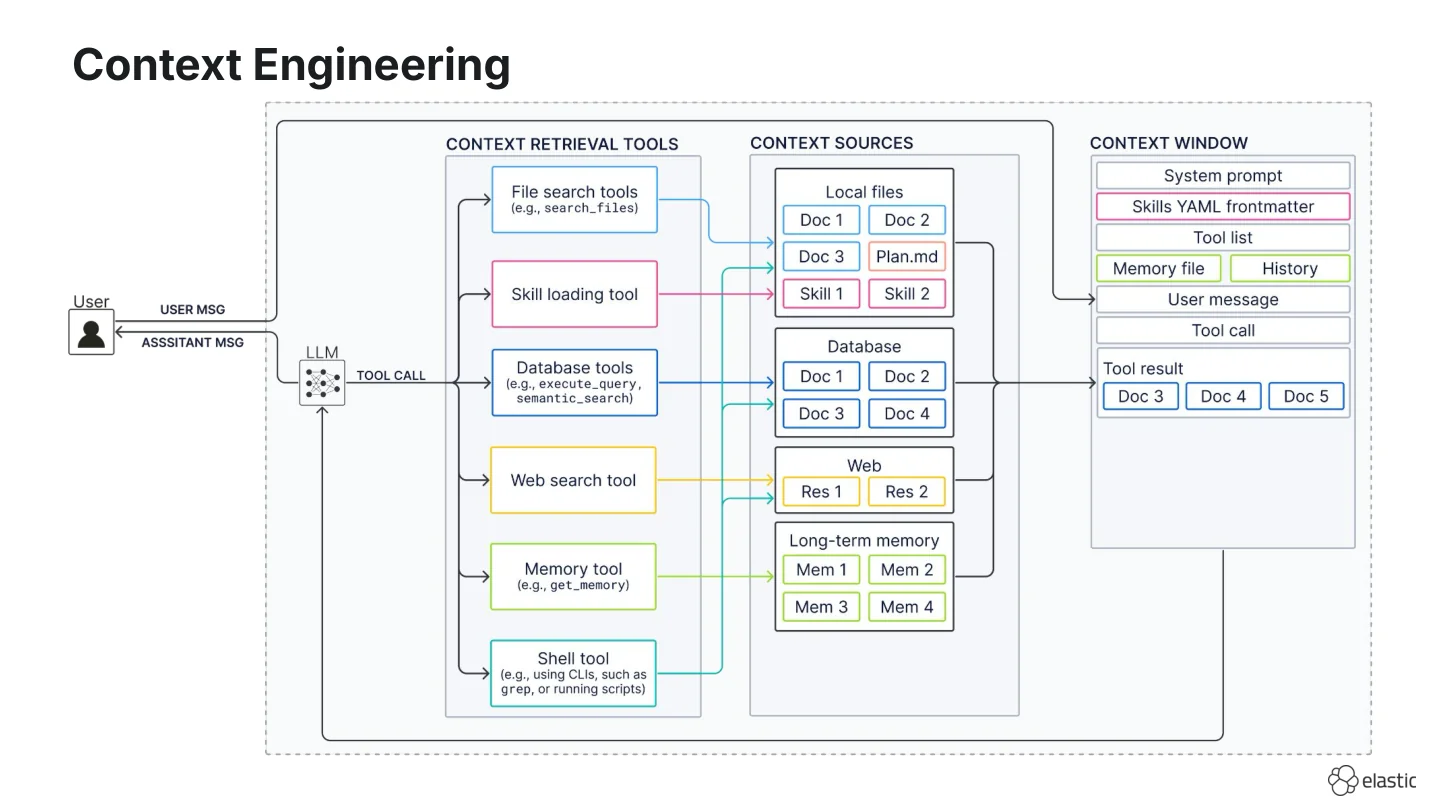
That’s why currently, there’s been a lot of discussion whether a shell tool is all an agent needs. If you’re interested in a deep dive into this discussion, I’ve written about it in this blog titled “The shell tool is not a silver bullet for context engineering”. The TLDR of that blog and the core topic of this workshop is that the practical question is which search tools belong in your stack, not shell tool versus all others.
If you take away one thing from this workshop, let it be this:
Doing good search is difficult. That is why we have so many different search techniques and why you curate a stack for your latency and quality requirements.
In this workshop, we take a look at a small selection of search tools to give you an intuition on their strengths and weaknesses.
Fundamentals of building search tools
Before we dive into some concrete search tools, let’s review some fundamentals of building effective search tools.
Challenges of agentic search
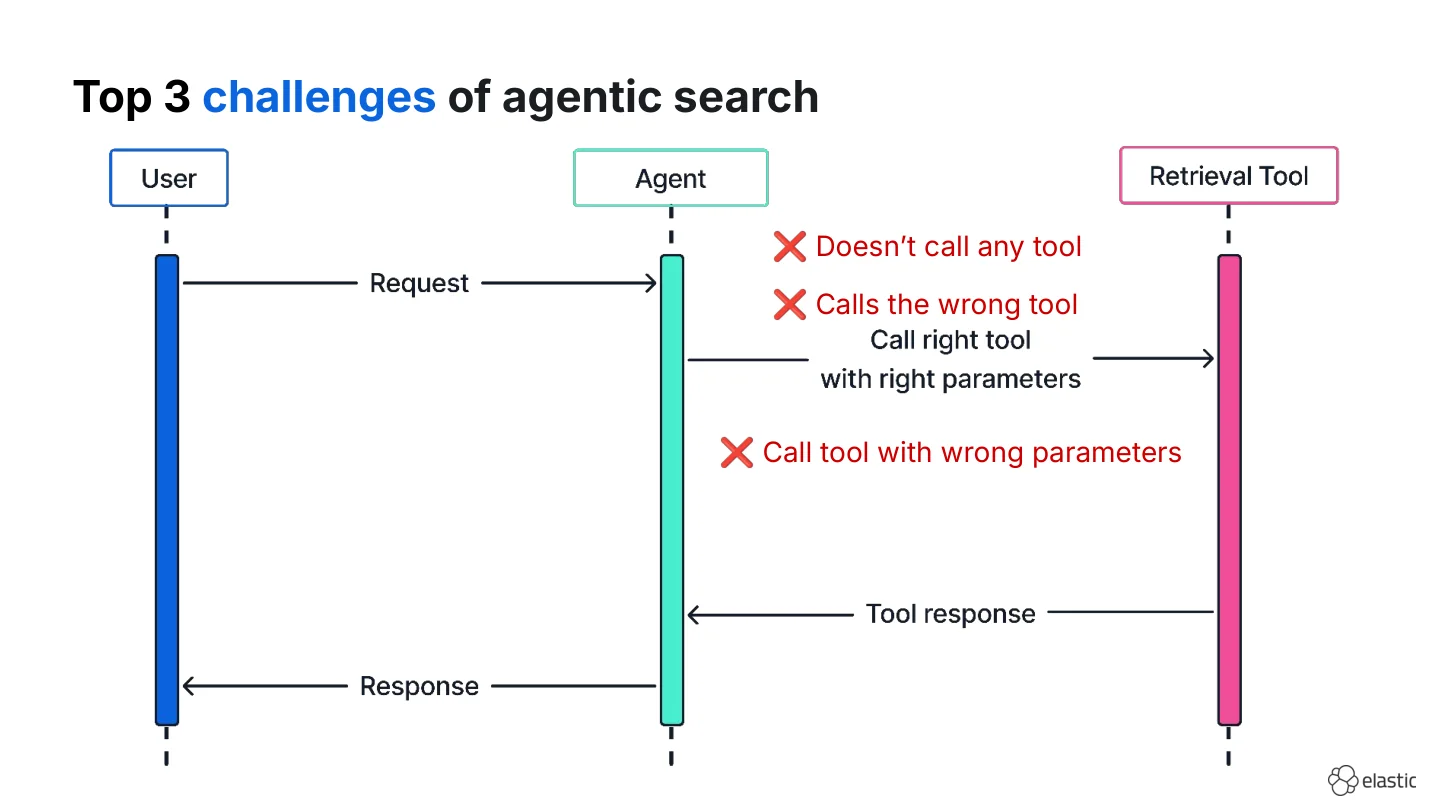
In theory agentic search looks simple:
- The user makes a request
- The agent calls the right tool with the right parameters
- The tool returns search results
- The agent responds with the correct answer.
But in reality, this can break in many different ways. At Elastic we help teams build agents on Elasticsearch data and these are the three most common failure modes we observe:
- The agent doesn’t call any tool at all and answers from parametric knowledge.
- The agent calls the wrong tool (e.g., web search instead of the company index).
- The agent calls the right tool with wrong parameters.
Let’s discuss some general best practices to overcome these challenges, so that when I demonstrate them to you in the next section, you will have an intuition on what to do. If you’re interested in more best practices, I’ve also written a guide on what we’ve learned about building effective database retrieval tools at Elastic.
Tool descriptions
I don’t like this slide because I feel like everyone knows that the tool description is the most important part of any tool. However, I’m going to quickly give you a refresher on it because any time I see a tool description, it’s the least effort one-line description and you’re wondering why your agent is failing to use it.
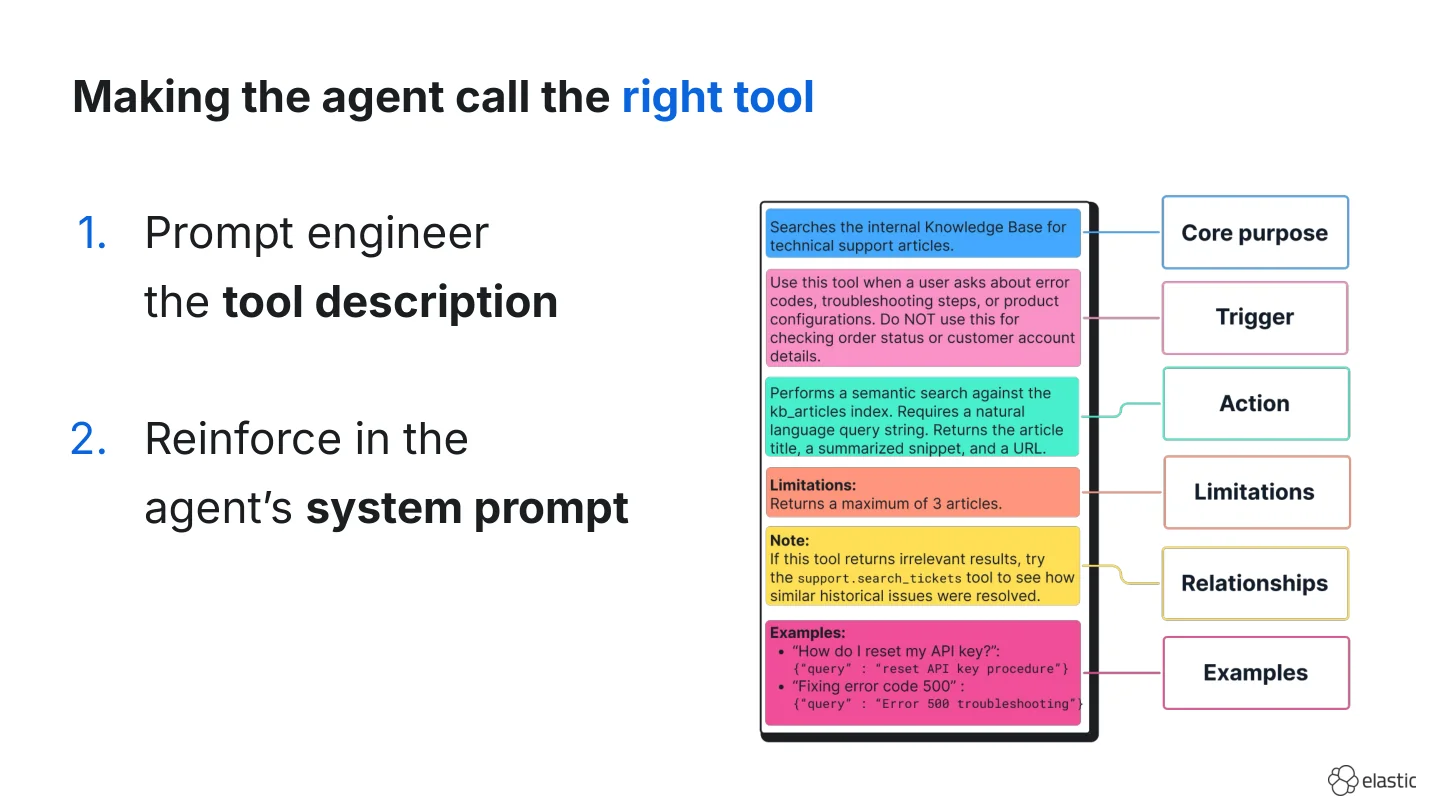
Admittedly, this template is quite long. I’m not saying that you need to follow this template at all times. Instead, start with a clear core purpose and trigger conditions. And when you notice your agent is struggling to use your tool, start adding more components of this template, such as actions, relationships, limitations, and examples.
If that is still not enough, repeat the same rules in the system prompt.
Parameter complexity
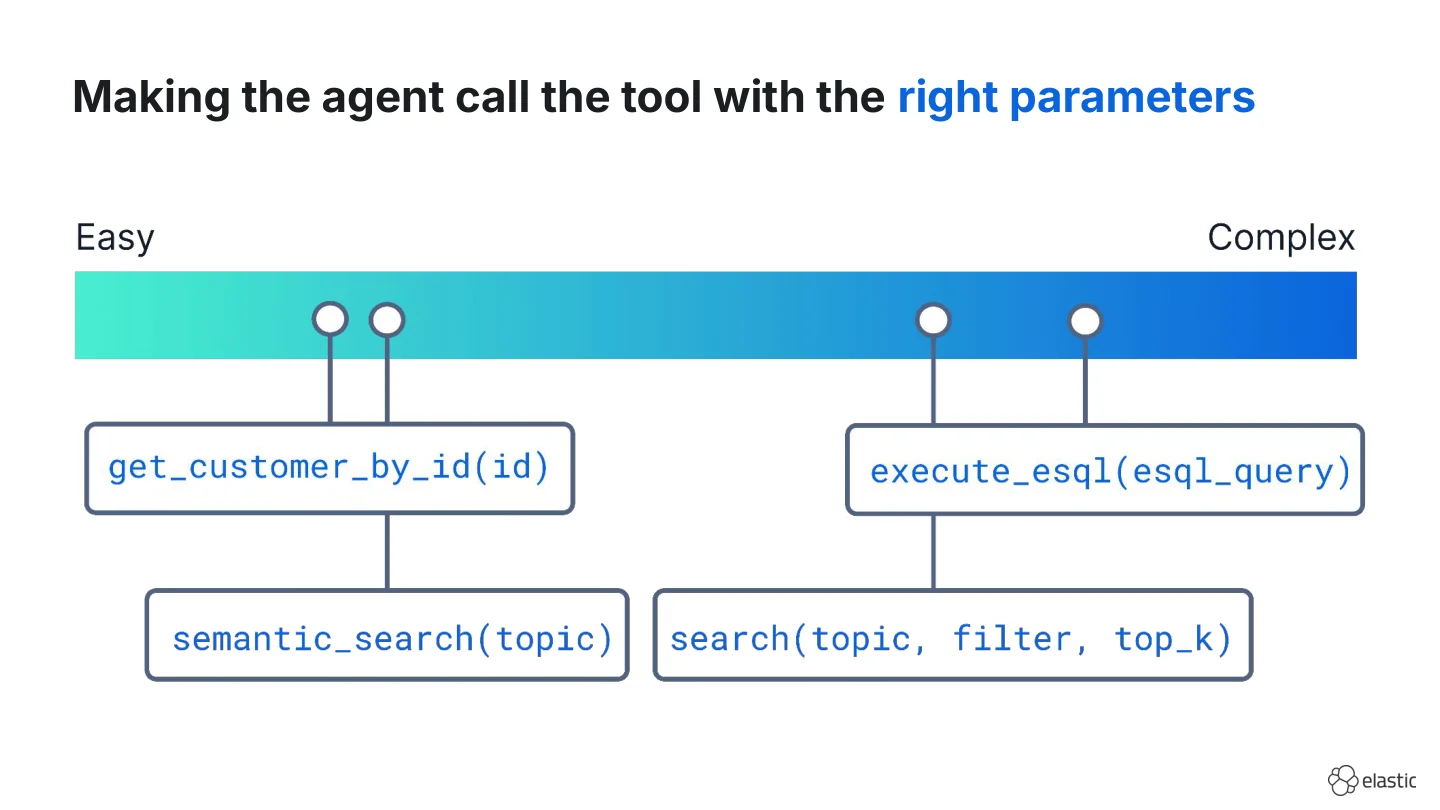
Another aspect to be aware of is parameter complexity. Because once the right tool is selected, the agent still has to fill in the arguments and some are easier to get right than others.
For example, the parameter for a tool get_customer_by_id is easy when the ID is in the message. Or a semantic search tool that takes in any string as a search query is usually fine. But when you start adding more parameters, such as filters or top_k, it can become more challenging for the LLM to generate valid parameters. But what if you have a general-purpose search tool that lets your agent write full SQL or ES|QL queries from scratch as the parameter? Most models are decent at generating valid SQL queries, but it increases the risk of failures.
Code walkthrough
Let’s look at a small selection of search tool implementations in practice. (I’d love to show you all of them but time is unfortunately limited.) You can find the full code in the workshop repository.
This code walkthrough uses LangChain for orchestration because it abstracts a lot of complexity away, so that we can focus on the high level concepts, and also because it provides a shell tool and other useful things out of the box.
For the demo, we use the AI Engineer Europe 2026 schedule dataset to search over.
The first two demos use a local Elasticsearch cluster, which you can spin up using the start-local script. The third reads the same data from disk. To focus on the core mechanics of the search tools, we will skip over the exact data preparation and ingestion steps, which are available in the notebook 00_prepare_data.ipynb.
Vanilla agentic search
Let’s refresh our memory on the minimal vanilla agentic search setup implemented in the first notebook 01_vanilla_agentic_search.ipynb first. It consists of one semantic search tool over the index conference_schedule, which contains one document per session.
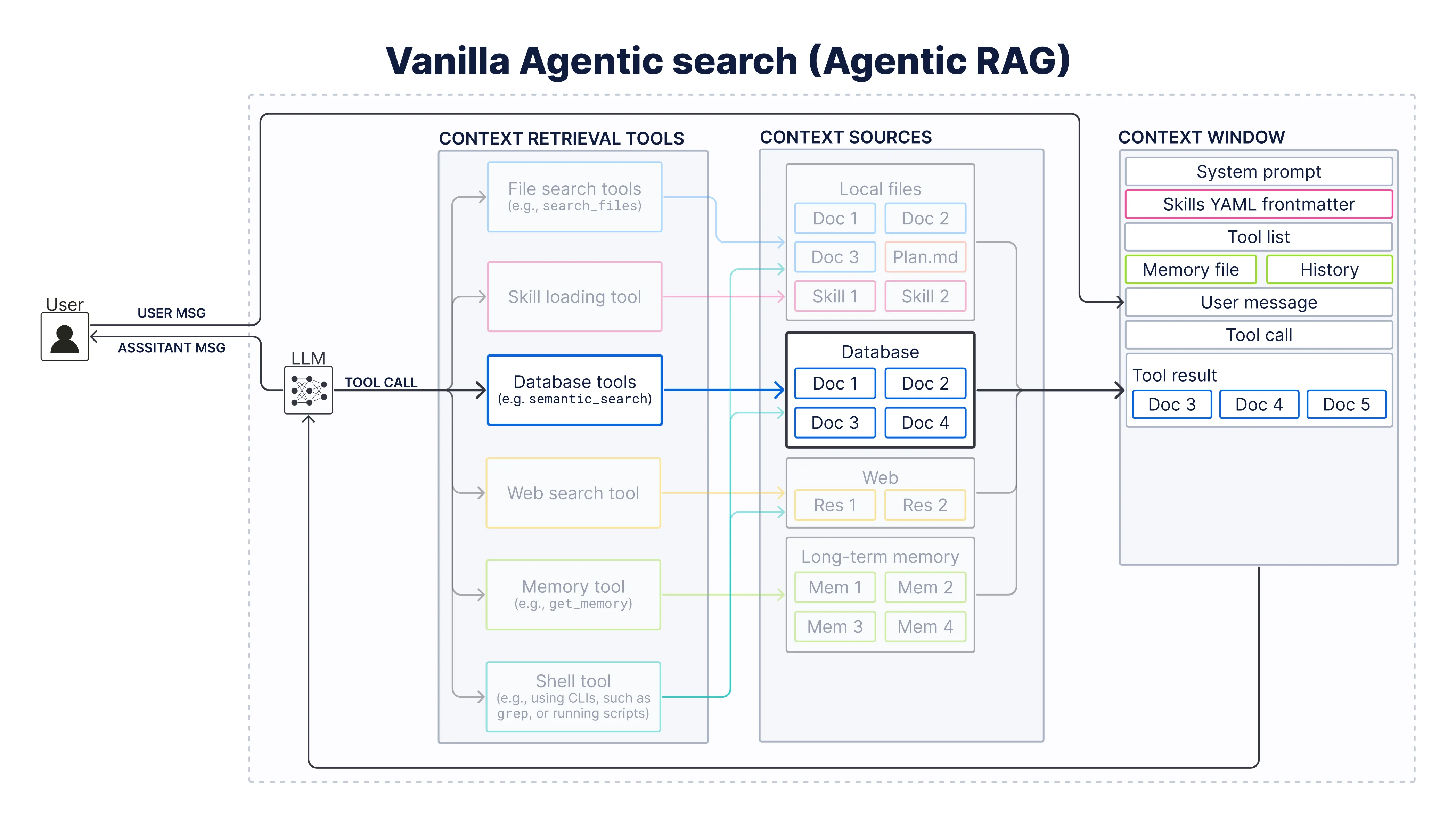
First, we set up an LLM, which is the core of any agent. Here we use gpt-5.4-nano through LiteLLM:
from langchain_openai import ChatOpenAI

llm = ChatOpenAI(
    openai_api_base=LITELLM_API_BASE,
    api_key=LITELLM_API_KEY,
    model="llm-gateway/gpt-5.4-nano",
    temperature=0.5,
)
Then we define a minimal system prompt, which tells the agent that it is a search agent, when to retrieve, and how the index is shaped:
You are a search agent tasked with answering questions about the AI Engineer Europe 2026 Conference.

You have access to different context retrieval tools to help you answer user queries.

Before answering a question decide whether or not you need to retrieve additional context to answer the question correctly.
If the retrieved context does not contain relevant information to answer the query, say that you don't know.

## Elasticsearch (`conference_schedule`)

The conference sessions are indexed in Elasticsearch. One document per session.

| Field | Description |
|--------------|------------|
| `text` | The string that was embedded: each session’s title plus description (blank line between them). It does not include day, time, room, or speakers. |
| `vector` | Dense embedding of `text`, used for similarity search. |
| `metadata` | Structured fields (see metadata description below) |


| Field | Description |
|--------------|------------|
| `metadata.title` | Title of the session|
| `metadata.day` | Date of the session (Example format: April 10) |
| `metadata.time` | Time slot of the session (Example format: 12:40-1:00pm) |
| `metadata.room` | Room where the session takes place |
| `metadata.type` | One of 'keynote', 'workshop', 'talk', 'track_keynote', 'lightning', 'expo_session' |
| `metadata.track` | Track |
| `metadata.speakers` | Name(s) of the speaker(s) as a single comma-separated string |
Next, we prepare the Elasticsearch client. For this, we prepare jina-embeddings-v5-text-small as the embedding model, which embeds queries at search time and connect to our ElasticsearchStore:
from langchain_community.embeddings import JinaEmbeddings
from langchain_elasticsearch import ElasticsearchStore

embeddings = JinaEmbeddings(
    jina_api_key=JINA_API_KEY,
    model_name="jina-embeddings-v5-text-small",
)

vector_store = ElasticsearchStore(
    es_url=ES_URL,
    es_user=ES_USERNAME,
    es_password=ES_PASSWORD,
    index_name="conference_schedule",
    embedding=embeddings,
)
Here comes the interesting part: Let’s define the search tool, which takes in a search query, runs a semantic search, and returns the top 3 results.
LangChain’s @tool decorator lets us convert any Python function into an agent tool and uses the function name as the tool name and the docstring as the description by default.
As you can see below, I already broke my own recommendation on tool descriptions from above because I’m using only a short docstring here. In this case, however, that’s enough because we only have one tool and a vanilla demo use case.
from langchain.tools import tool

@tool()
def semantic_search_conference_sessions(query: str) -> str:
    """Runs a semantic search query to find conference sessions by concept or topic.

    Args:
        query: The topic or concept used as search query to search for.

    Returns:
        A string containing the information about the sessions.
    """
    docs = vector_store.similarity_search(query, k=3)
    return "\n\n".join(
        f"**{doc.metadata['type']} by {doc.metadata['speakers']}**: "
        f"{doc.metadata['title']}\nDescription:{doc.page_content}"
        for doc in docs
    )
Now, we have all the components that make up an AI agent (usually, you’d also have “memory”, but it is omitted here on purpose to focus on the search tools) and all we have to do is to plug them together.
from langchain.agents import create_agent

agent = create_agent(
    model=llm,
    system_prompt=SYSTEM_PROMPT,
    tools=[semantic_search_conference_sessions],
)
For an example semantic search query “Which sessions discuss regulatory constraints in AI systems?” the agent now calls the tool and correctly finds Bilge Yücel’s talk on engineering AI under sovereignity constraints.
================================ Human Message =================================

Which sessions discuss regulatory constraints in AI systems?
================================== Ai Message ==================================
Tool Calls:
  semantic_search_conference_sessions (call_FE570VnExWZOmupAtjduUcIB)
 Call ID: call_FE570VnExWZOmupAtjduUcIB
  Args:
    query: regulatory constraints in AI systems law regulation compliance governance EU AI Act policy constraints
================================= Tool Message =================================
Name: semantic_search_conference_sessions

**talk by Bilge Yücel**: Engineering AI Systems Under Sovereignty Constraints
Description: Regulatory and jurisdictional constraints are no longer an edge case in AI system design; [...]

**talk by Dan James**: Building the Justice AI Unit: Shipping Production AI Inside Government
Description: [...]

**workshop by Liam McGarrigle**: Building Your Own Secure AI Workflows: Human-in-the-Loop Automation with n8n
Description: [...]
================================== Ai Message ==================================

The conference sessions that discuss regulatory constraints / legal or jurisdictional limitations on AI systems are:

- **Bilge Yücel — “Engineering AI Systems Under Sovereignty Constraints”** (talk)
  Focus: how legal/jurisdictional limits affect AI architecture—e.g., **data localization, auditability, model transparency, and jurisdictional control**.

- **Dan James — “Building the Justice AI Unit: Shipping Production AI Inside Government”** (talk)
  Focus: building and deploying production AI **inside government**, where regulatory/operational constraints apply.

If you want, tell me whether you mean **EU AI Act–specific compliance** or **broader regulation/governance**, and I can narrow it further.
This is where most agentic search demos stop.
This is also where it starts to get interesting.
To break this demo that’s built on a semantic search tool, all you have to do is to ask it something where a keyword-based search would be more suitable than a semantic search. For example, if I ask “Which sessions should I visit to learn more about GEPA?”, the semantic search returns unrelated sessions, but not the correct one by Samuel Colvin.
================================ Human Message =================================

Which sessions should I visit to learn more about GEPA?
================================== Ai Message ==================================
Tool Calls:
  semantic_search_conference_sessions (call_fV9IHwnZVgqM8RPdfyT9pNr8)
 Call ID: call_fV9IHwnZVgqM8RPdfyT9pNr8
  Args:
    query: GEPA
================================= Tool Message =================================
Name: semantic_search_conference_sessions

keynote by Omar Sanseviero: Gemma, DeepMind's Family of Open Models
Description:Gemma, DeepMind's Family of Open Models

Google DeepMind’s Gemma family is expanding. Join us for a deep dive into the latest models of the Gemma ecosystem. From vibe fine-tuning to Sovereign AI, you'll learn about the latest model capabilities, how to build high-performance applications, and how to get started with open models.

track_keynote by Ryan Lopopolo: Harness Engineering AMA
Description:Harness Engineering AMA

talk by Dan James: Building the Justice AI Unit: Shipping Production AI Inside Government
Description:Building the Justice AI Unit: Shipping Production AI Inside Government

Building the Justice AI Unit (https://ai.justice.gov.uk/) — forward-deployed engineers, entrepreneurial model, shipping production AI every day, but inside government.
================================== Ai Message ==================================

I searched the conference schedule for **“GEPA”**, but the only matching items I found were about **DeepMind’s “Gemma”** (an open models family), not GEPA itself. So I **don’t know which sessions are specifically about GEPA** based on the available schedule data.

If you meant **Gemma** (DeepMind), the relevant session is:
- **Keynote — “Gemma, DeepMind's Family of Open Models”** (Omar Sanseviero)

Can you confirm what **GEPA** stands for (or share a speaker/session name)? Then I can re-search and give you the right sessions.
Agentic search with general-purpose database search tool
What if the agent could fully autonomously write entire search queries from scratch? Let’s replace the narrow scoped semantic search tool with a more general purpose tool (execute_esql_query) for this as implemented in the notebook 02_agentic_search_with_db_query_tool.ipynb.
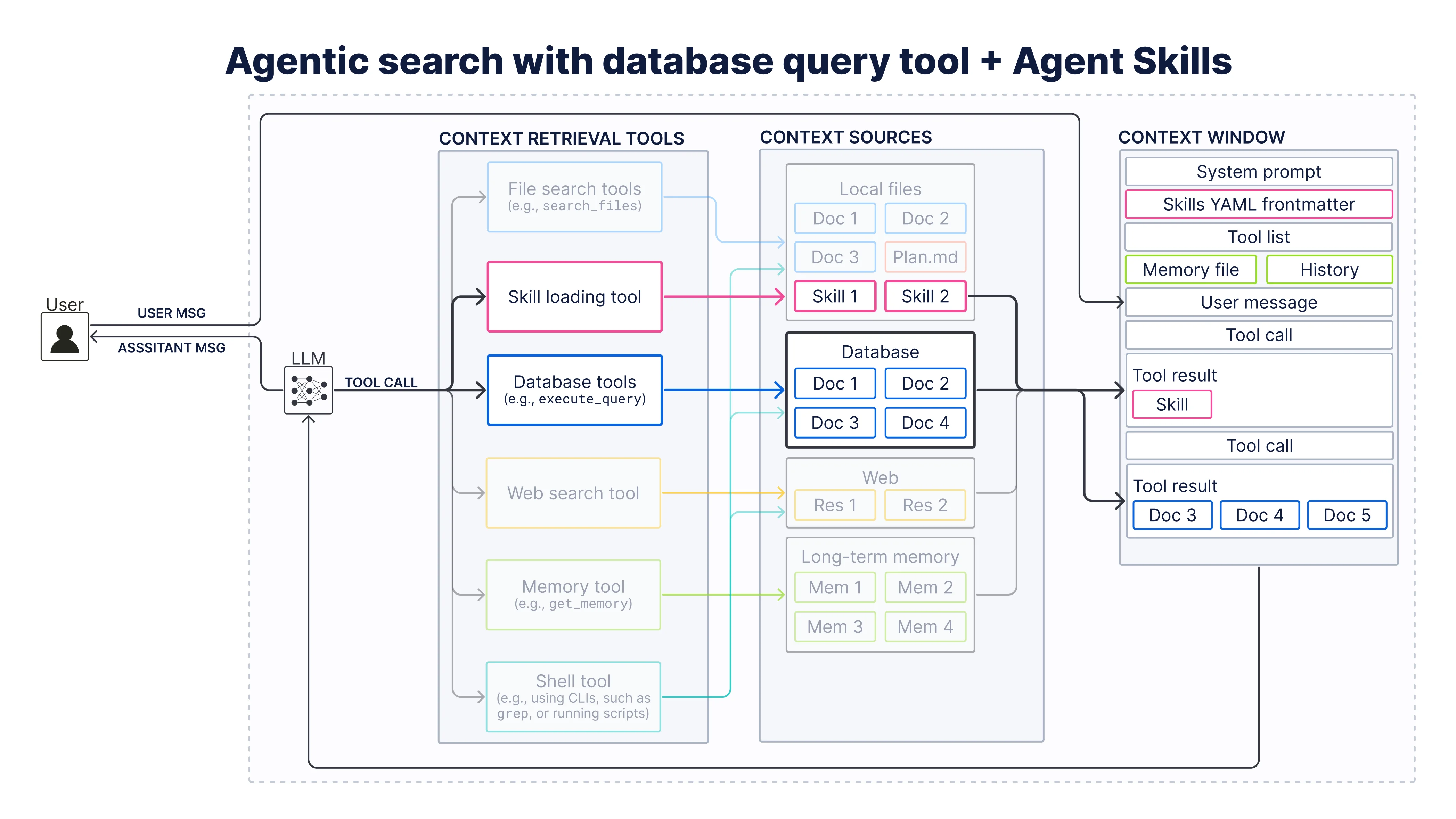
First, we switch from gpt-5.4-nano to gpt-5.4-mini because query generation is harder than passing a topic.
Then, we define a general-purpose database query tool that let’s the agent run full ES|QL queries against Elasticsearch.
@tool()
def execute_esql_query(esql_query: str) -> str:
    """Execute an ES|QL query against the conference_schedule index in Elasticsearch.

    Args:
        esql_query: The ES|QL query to execute

    Returns:
        A string containing the information about the sessions.
    """
    try:
        response = es_client.esql.query(query=esql_query, format="csv")
        return response.body
    except Exception as e:
        return f"Error executing ES|QL query: {e}"
One thing to note is that we also add a try/except block here that returns some meaningful information if the ES|QL query throws an error, so the agent can self-correct.
Now, when we run the same question “Which sessions should I visit to learn more about GEPA?” as earlier, we can see that the agent generates something that looks like valid ES|QL at first glance:
FROM conference_schedule
| WHERE text LIKE '%GEPA%'
| KEEP metadata.speakers, metadata.title, text
| LIMIT 3
However, this tool call returns zero search results because %GEPA%, which uses % wildcards, which is a SQL habit. ES|QL instead uses * for wildcards.
Note, that you should also think about how to handle zero search results. Decide in your product whether zero rows means “nothing found” or “retry with different parameters.”
There are many options to overcome this, such as improving the instructions or adding ES|QL specific agent skills. For this tutorial, we will define a minimal skill. For production, I recommend to checkout Elastic Agent Skills.
from typing import TypedDict

class Skill(TypedDict):
    name: str
    description: str
    content: str

SKILLS: list[Skill] = [
    {
        "name": "elasticsearch-esql",
        "description": """Execute ES|QL (Elasticsearch Query Language) queries, use when the user wants to
  query Elasticsearch data, analyze logs, aggregate metrics, explore data, or create
  charts and dashboards from ES|QL results.""",
        "content": """
# Elasticsearch ES|QL
...
### Pattern Matching
- `LIKE` Wildcard pattern (`*` zero or more chars, `?` single char)
...
ES|QL uses **double quotes** for string literals, never single quotes.
""",
    },
]
To use the Agent Skills, we will copy the Basic implementation for Agent Skills from the LangChain documentation for a skill loading tool load_skill and a SkillMiddleware, which injects skill descriptions and registers load_skill.
@tool
def load_skill(skill_name: str) -> str:
    """Load the full content of a skill into the agent's context."""
    for skill in SKILLS:
        if skill["name"] == skill_name:
            return f"Loaded skill: {skill_name}\n\n{skill['content']}"
    available = ", ".join(s["name"] for s in SKILLS)
    return f"Skill '{skill_name}' not found. Available skills: {available}"
Now we also have to tell the agent to call the ES|QL skill before calling the execute_esql_query tool. For this we adjust the tool description by adding this relationship:
@tool()
def execute_esql_query(esql_query: str) -> str:
    """Execute an ES|QL query against an index in Elasticsearch.
    Always use the Elasticsearch ES|QL skill to generate the ES|QL query
    before using this tool to execute the query.
    ...
    """
And we re-enforce this in the system prompt:
SYSTEM_PROMPT_WITH_SKILL = SYSTEM_PROMPT + (
    "If you need to execute an ES|QL query, use the Elasticsearch ES|QL skill "
    "to generate the query before using this tool to execute the query. "
    "If an ESQL query returns an error use the Elasticsearch ES|QL skill "
    "to generate a new query."
)
Now we plug in all components including the SkillMiddleware:
agent = create_agent(
    model=llm,
    system_prompt=SYSTEM_PROMPT_WITH_SKILL,
    middleware=[SkillMiddleware()],
    tools=[execute_esql_query],
)
The traces now show that the agent first calls the ES|QL skill and uses it to write valid ES|QL queries when calling the execute_esql_query tool. The results show that this way the agent is able to find the correct session.
================================ Human Message =================================

Which sessions should I visit to learn more about GEPA?
================================== Ai Message ==================================
Tool Calls:
  load_skill (call_pUblqD2S7iLb6hjEaI7xZZJr)
 Call ID: call_pUblqD2S7iLb6hjEaI7xZZJr
  Args:
    skill_name: elasticsearch-esql
================================= Tool Message =================================
Name: load_skill

Loaded skill: elasticsearch-esql


# Elasticsearch ES|QL

Execute ES|QL queries against Elasticsearch.

## What is ES|QL?

ES|QL (Elasticsearch Query Language) is a piped query language for Elasticsearch. It is **NOT** the same as SQL.

[...]

================================== Ai Message ==================================
Tool Calls:
  execute_esql_query (call_rYOHyKLoB9vsAF77NKGJD9vr)
 Call ID: call_rYOHyKLoB9vsAF77NKGJD9vr
  Args:
    esql_query: FROM conference_schedule
| WHERE text LIKE "*GEPA*" OR metadata.title LIKE "*GEPA*"
| KEEP metadata.title, metadata.day, metadata.time, metadata.room, metadata.type, metadata.track, metadata.speakers
| SORT metadata.day, metadata.time
================================= Tool Message =================================
Name: execute_esql_query

metadata.title,metadata.day,metadata.time,metadata.room,metadata.type,metadata.track,metadata.speakers
Playground in Prod - Optimising Agents in Production Environments,April 8,10:40am-12:00pm,Westminster,workshop,,Samuel Colvin
================================== Ai Message ==================================

The session I found related to GEPA is:

- **Playground in Prod - Optimising Agents in Production Environments**
  - **When:** April 8, 10:40am–12:00pm
  - **Where:** Westminster
  - **Type:** Workshop
  - **Speaker:** Samuel Colvin

If you want, I can also look for sessions about **agents**, **optimization**, or **production environments** that may be relevant to GEPA even if they don’t mention it by name.
Since this tool is general-purpose, the agent can also use it for analytical questions, such as “How many sessions are on April 8?” by using STATS. This is especially useful because otherwise, the agent would have to filter for all sessions on April 8th, and then count them. And we all know how notoriously bad LLMs are at counting.
================================ Human Message =================================

How many sessions are on April 8th?
================================== Ai Message ==================================
Tool Calls:
  load_skill (call_5Ki25LYVnkx245nEDSM3xwwz)
 Call ID: call_5Ki25LYVnkx245nEDSM3xwwz
  Args:
    skill_name: elasticsearch-esql
================================= Tool Message =================================
Name: load_skill

Loaded skill: elasticsearch-esql


# Elasticsearch ES|QL

Execute ES|QL queries against Elasticsearch.

## What is ES|QL?

ES|QL (Elasticsearch Query Language) is a piped query language for Elasticsearch. It is **NOT** the same as SQL.

[...]

================================== Ai Message ==================================
Tool Calls:
  execute_esql_query (call_0TSZEVO7uRGKGj2sfOE2VcEV)
 Call ID: call_0TSZEVO7uRGKGj2sfOE2VcEV
  Args:
    esql_query: FROM conference_schedule | WHERE metadata.day == "April 8" | STATS count = COUNT()
================================= Tool Message =================================
Name: execute_esql_query

count
27
================================== Ai Message ==================================

There are **27 sessions** on **April 8th**.
As you can see, the general-purpose execute_esql_query is more powerful than the narrow scoped semantic_search tool because it can handle more ambiguous or complex queries. At the same time, adding a skill loading tool adds cost and latency and it requires a more powerful LLM.
Agentic search with shell tool
Finally, let’s talk about the hottest topic in agentic search at the moment: “Bash + Filesystem is all you need”.
You can find the related implementation in 03_agentic_search_with_shell_tool.ipynb. For this, we move the same data from the Elasticsearch cluster to local files under ../data/session_data/ (one .txt per session) and let the agent search over them with LangChain’s ShellTool.
First, we instantiate the shell tool:
from langchain_community.tools import ShellTool

shell_tool = ShellTool()  # no safeguards by default; sandbox in production
Note that the shell tool doesn’t have any safeguards by default and it is recommended to use it only in a sandboxes environment.
The system prompt for this example is similar to the ones described previously, expect that we now describe the data in the filesystem instead of the Elasticsearch cluster:
You are a search agent tasked with ...

## Local filesystem (`session_data`)

The conference sessions are available under under `../data/session_data/`. One file per session.

File structure:
```
../
data/
 └── session_data/
  ├── workshop/
  │ ├── <title>.txt
  │ └── ...
  ├── ...
  └── expo_session/
```

File Sample:
```
# <Title>

- **Day:** <Date of the session>
- **Time:** <Time slot of the session>
- **Room:** <Room where the session takes place>
- **Type:** <One of 'keynote', 'workshop', 'talk', 'track_keynote', 'lightning', 'expo_session'>
- **Speakers:** <Name(s) of the speaker(s)>

<Description>
```
For “Are there any sessions about GEPA?” the agent now first explores the filesystem and then simply greps for “GEPA” and finds the right session.
================================ Human Message =================================

Are there any sessions about GEPA?
================================== Ai Message ==================================
Tool Calls:
  terminal (call_w0Yi8vNRxFy8EgbJsvBOqSJI)
 Call ID: call_w0Yi8vNRxFy8EgbJsvBOqSJI
  Args:
    commands: ['ls -R ../data/session_data | head', 'grep -Ril "GEPA" ../data/session_data | head -n 50']
Executing command:
 ['ls -R ../data/session_data | head', 'grep -Ril "GEPA" ../data/session_data | head -n 50']
================================= Tool Message =================================
Name: terminal

expo_session
keynote
lightning
talk
track_keynote
workshop

../data/session_data/expo_session:
Comprehend First, Code Later The AI Skill I Rely On Daily.txt
Expo Session – AMA AIE Europe with swyx.txt
../data/session_data/workshop/Playground in Prod - Optimising Agents in Production Environments.txt
================================== Ai Message ==================================
Tool Calls:
  terminal (call_s1QbL16Xg8p1RRxNhciTys9F)
 Call ID: call_s1QbL16Xg8p1RRxNhciTys9F
  Args:
    commands: ['grep -Ril "GEPA" ../data/session_data']
Executing command:
 ['grep -Ril "GEPA" ../data/session_data']
================================= Tool Message =================================
Name: terminal

../data/session_data/workshop/Playground in Prod - Optimising Agents in Production Environments.txt
================================== Ai Message ==================================
Tool Calls:
  terminal (call_WpzxO7kadUuXmZLpfUvRt66E)
 Call ID: call_WpzxO7kadUuXmZLpfUvRt66E
  Args:
    commands: ['cat "../data/session_data/workshop/Playground in Prod - Optimising Agents in Production Environments.txt" | sed -n \'1,200p\'']
Executing command:
 ['cat "../data/session_data/workshop/Playground in Prod - Optimising Agents in Production Environments.txt" | sed -n \'1,200p\'']
================================= Tool Message =================================
Name: terminal

# Playground in Prod - Optimising Agents in Production Environments

[...]

**Description:** Deploying an agent is just the beginning. [...]
================================== Ai Message ==================================

Yes—there is at least one session that mentions **GEPA**:

- **Playground in Prod - Optimising Agents in Production Environments** (workshop)
  - **Day/Time:** April 8, 10:40am–12:00pm
  - **Room:** Westminster
  - **Speaker:** Samuel Colvin
  - **Where GEPA appears:** The session includes **“Autonomous optimisation with GEPA”** and explains how GEPA can be wired into Logfire’s managed variables to create an optimisation loop that improves agent prompts based on production traces.
But now let’s try it with the semantic search query “Which sessions discuss handling regulatory constraints?” from earlier to see how agents can cheat at semantic search with grep. You can see that the agent starts by looking for “regulat”, which I guess is fair because that way it can find terms like “regulatory” and “regulation”. But then it starts together related synonyms (compliance, constraints, GDPR, governance) until something hits.
================================ Human Message =================================

Which sessions discuss handling regulatory constraints?
================================== Ai Message ==================================
Tool Calls:
  terminal (call_b57oFP6PhsfwyUEepsuXQvCV)
 Call ID: call_b57oFP6PhsfwyUEepsuXQvCV
  Args:
    commands: ['ls -R ../data/session_data | head', 'find ../data/session_data -type f | wc -l', 'grep -Ril "regulat" ../data/session_data | head -n 20', 'grep -Ril "compliance\\|constraint\\|constraints\\|GDPR\\|governance" ../data/session_data | head -n 20']
Executing command:
 ['ls -R ../data/session_data | head', 'find ../data/session_data -type f | wc -l', 'grep -Ril "regulat" ../data/session_data | head -n 20', 'grep -Ril "compliance\\|constraint\\|constraints\\|GDPR\\|governance" ../data/session_data | head -n 20']
================================= Tool Message =================================
Name: terminal

expo_session
keynote
lightning
talk
track_keynote
workshop

../data/session_data/expo_session:
Comprehend First, Code Later The AI Skill I Rely On Daily.txt
Expo Session – AMA AIE Europe with swyx.txt
     167
../data/session_data/talk/Engineering AI Systems Under Sovereignty Constraints.txt
../data/session_data/talk/Connecting the Dots with Context Graphs.txt
../data/session_data/talk/Lessons from Scaling GitHub's Remote MCP Server.txt
../data/session_data/talk/Scaling the Next Paradigm of Heterogeneous Intelligence.txt
../data/session_data/talk/Engineering AI Systems Under Sovereignty Constraints.txt
================================== Ai Message ==================================
Tool Calls:
  terminal (call_SqWPOrRycbG0wwkv2ryWeIYZ)
 Call ID: call_SqWPOrRycbG0wwkv2ryWeIYZ
  Args:
    commands: ['sed -n \'1,200p\' "../data/session_data/talk/Engineering AI Systems Under Sovereignty Constraints.txt"', 'sed -n \'1,160p\' "../data/session_data/keynote/Gemma, DeepMind\'s Family of Open Models.txt"', 'sed -n \'1,160p\' "../data/session_data/talk/Connecting the Dots with Context Graphs.txt"']
Executing command:
 ['sed -n \'1,200p\' "../data/session_data/talk/Engineering AI Systems Under Sovereignty Constraints.txt"', 'sed -n \'1,160p\' "../data/session_data/keynote/Gemma, DeepMind\'s Family of Open Models.txt"', 'sed -n \'1,160p\' "../data/session_data/talk/Connecting the Dots with Context Graphs.txt"']
================================= Tool Message =================================
Name: terminal

# Engineering AI Systems Under Sovereignty Constraints
[...]
**Description:** Regulatory and jurisdictional constraints are no longer an edge case in AI system design; [...]

# Gemma, DeepMind's Family of Open Models
[...]
**Description:** Google DeepMind’s Gemma family is expanding. [...]

# Connecting the Dots with Context Graphs
[...]
**Description:** AI systems need more than intelligence; they need context that persists. [...]
================================== Ai Message ==================================

The sessions that discuss handling **regulatory constraints** (including sovereignty/jurisdiction/legal boundaries) are:

- **“Engineering AI Systems Under Sovereignty Constraints”** (Talk) — April 9, 12:40–1:00pm, Room St. James
  *Focus:* how regulatory/jurisdictional constraints affect AI architecture, including data localization, auditability, transparency, and governance by design.

If you want, I can also list sessions that mention related topics like *compliance*, *GDPR*, or *governance* specifically (the dataset only clearly surfaced the one above under regulatory/constraint language).
This works almost unreasonably well, but is the most effective? For example, the agent would have to chain together all animals if I’d ask it to find “movies with animal superheroes.”
That’s why were currently seeing many semantic search alternatives to grep: LlamaIndex’ semtools, LightOn’s colgrep, and Jina AI’s jina-grep-cli.
Let’s give our agent access to jina-grep-cli and see how that works. First, you have to install the CLI according to the instructions in the repository.
Then, all you have to do is to tell your agent about it and how to use it in the system prompt:
You are a search agent tasked with ...

## Local filesystem (`session_data`)

The conference sessions are available under ...

## Context retrieval tools

You have access to the following tools to find additional information:

- **Terminal (bash / shell):** run shell commands on the host.

### jina-grep: standalone semantic search

[`jina-grep`](https://github.com/jina-ai/jina-grep-cli) is a CLI for semantic search over files.

Form:
````
jina-grep [OPTIONS] "<query>" [FILES]...`
````

**Grep-compatible (standalone):**

- `-r`, `-R`: recursive search when the path is a directory
- `-l`: print only filenames with matches
...

**Semantic:**

- `--threshold`: cosine similarity threshold (default: `0.5`)
- `--top-k`: max results (default: `10`)
...

**Examples**

````bash
jina-grep -r --top-k 5 "memory leak" /data/session_data
jina-grep -r --threshold 0.35 "observability and evals" /data/session_data/talk
jina-grep -r "context engineering for agents" /data/session_data/
````

### grep vs jina-grep

- **Exact substring, known filename, or simple listing?** Use **`grep` / `find` / `cat`**.
- **Natural-language or fuzzy “what talks mention X?” over many `.txt` files locally?** Use **`jina-grep`** as above. Only run one jina-grep command at a time. Do NOT chain multiple jina-grep-cli commands together when calling the shell tool.
For “Which sessions discuss handling regulatory constraints?” with this prompt loaded, the agent is now able to find the right session more efficiently:
================================ Human Message =================================

Which sessions discuss handling regulatory constraints?
================================== Ai Message ==================================
Tool Calls:
  terminal (call_6OrqroK96CcV0dzW9I8RqVX6)
 Call ID: call_6OrqroK96CcV0dzW9I8RqVX6
  Args:
    commands: ['ls -R ../data/session_data | head', 'jina-grep -r --top-k 10 "regulatory constraints" ../data/session_data']
Executing command:
 ['ls -R ../data/session_data | head', 'jina-grep -r --top-k 10 "regulatory constraints" ../data/session_data']
================================= Tool Message =================================
Name: terminal

expo_session
keynote
lightning
talk
track_keynote
workshop

../data/session_data/expo_session:
Comprehend First, Code Later The AI Skill I Rely On Daily.txt
Expo Session – AMA AIE Europe with swyx.txt
Loading model... done
../data/session_data/talk/Engineering AI Systems Under Sovereignty Constraints.txt:1:# Engineering AI Systems Under Sovereignty Constraints ... [0.374]
../data/session_data/talk/How to build a personal computer use agent and where the limits are.txt:1:# How to build a personal computer use agent and where the limits are ... [0.227]
...
../data/session_data/talk/Bringing MCPs to the Enterprise.txt:1:# Bringing MCPs to the Enterprise... [0.185]

================================== Ai Message ==================================

The conference sessions that discuss handling **regulatory / jurisdictional constraints** include:

- **“Engineering AI Systems Under Sovereignty Constraints”** (Talk) — *Apr 9, 12:40–1:00pm, St. James* — Speaker: **Bilge Yücel**
  *Focus:* how legal/jurisdictional requirements like data localization, auditability, and jurisdictional control translate into AI system architecture decisions.

If you meant a broader interpretation (e.g., “compliance”, “privacy”, “GDPR”, “risk”) tell me and I can search for those terms too.
Practical recommendations
In this workshop, we looked at the broad landscape of search tools for context engineering and then explored a small selection of them to understand their strengths and weaknesses. The goal of this workshop is not to advocate for the one best search tool. Instead, I want to highlight the importance of curating a small set that matches how your agent actually behaves.
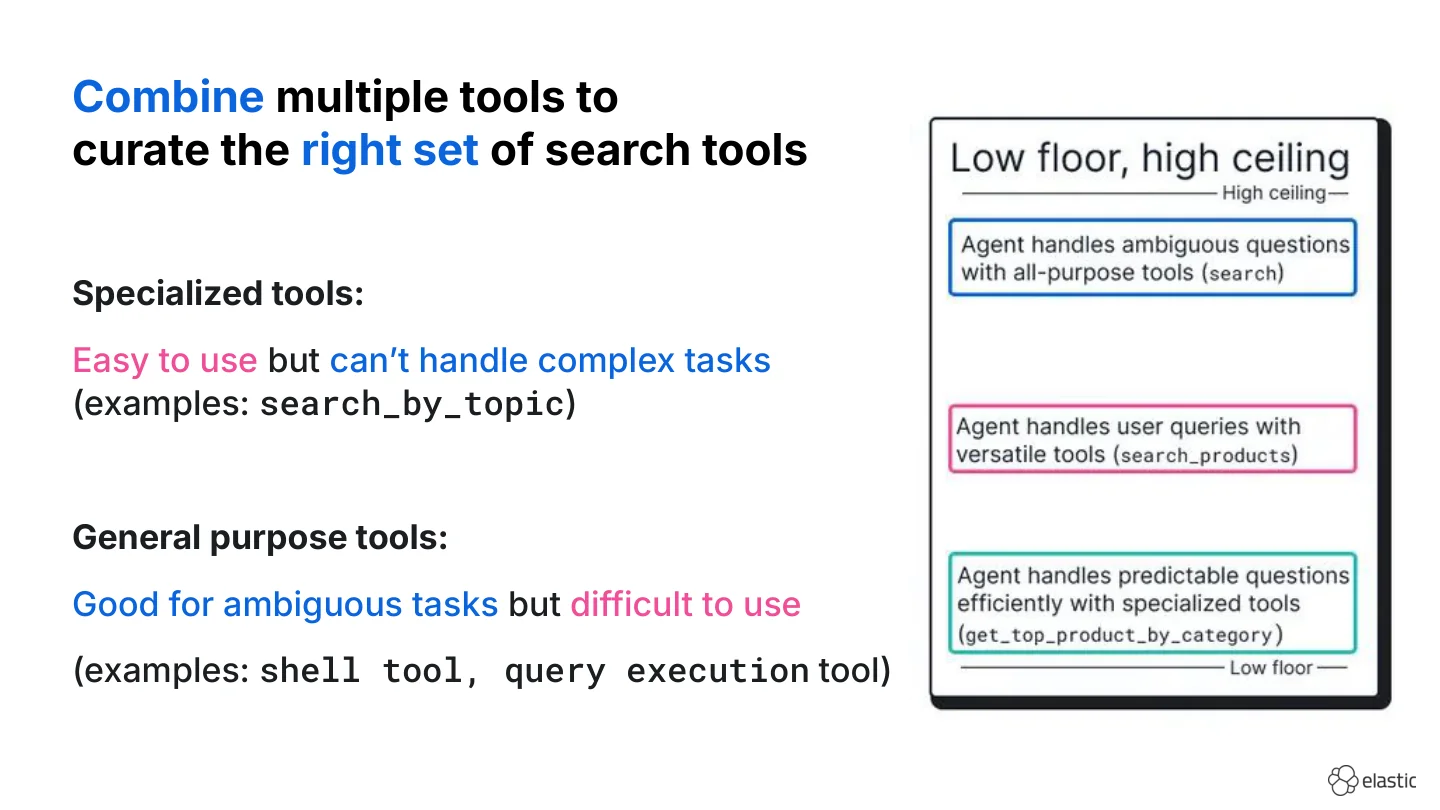
A useful framing is “low floor, high ceiling”:
- Specialized tools (e.g., semantic search with a topic string, lookup-by-ID) have simple parameters, fail less often, and cost fewer tokens.
- General-purpose tools (shell, raw ES|QL) handle edge cases but may need more iterations and a stronger model.
Ideally, you want both: easy wins for common queries and an escape hatch for the long tail.
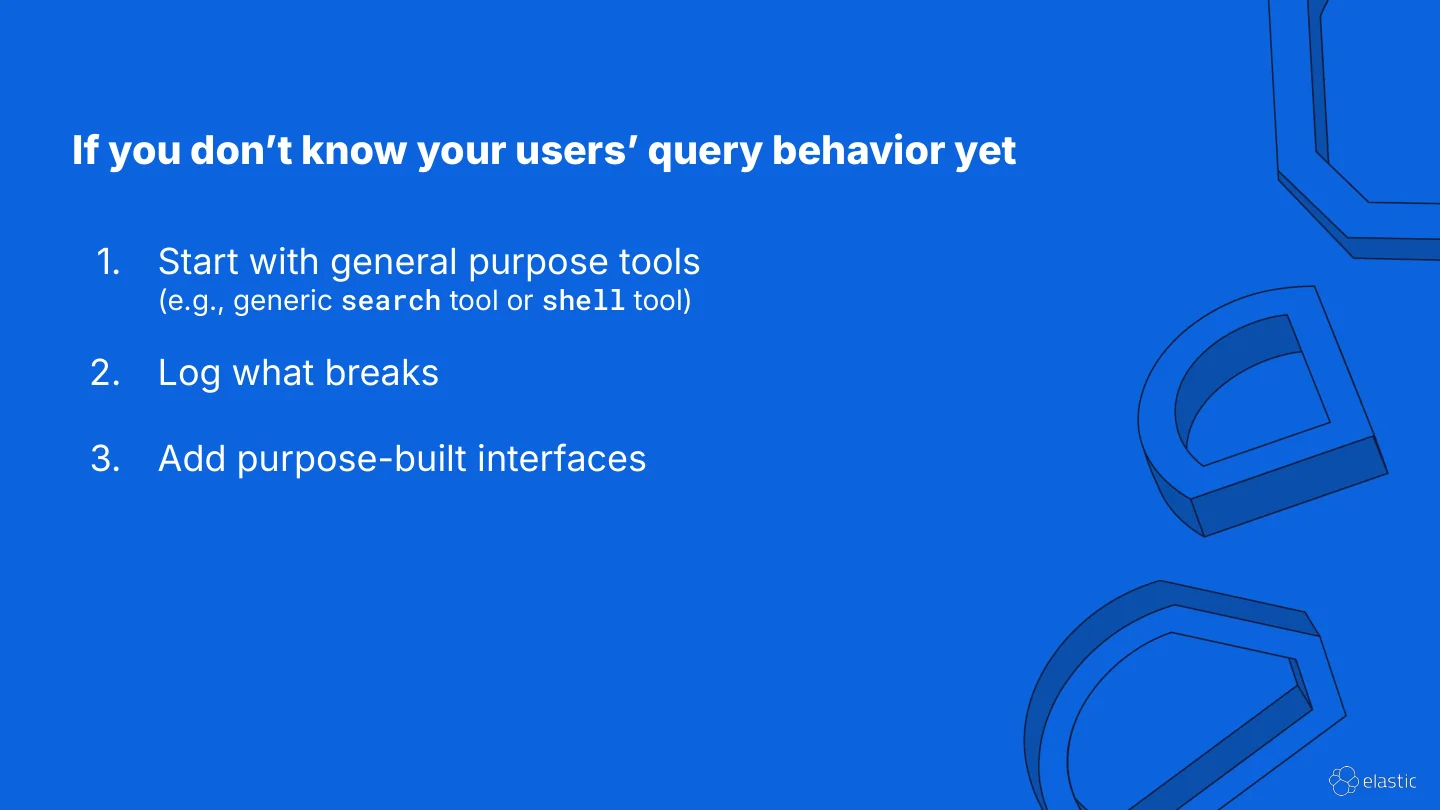
If you already know what your agent’s query patterns and use cases are you can directly scope out specialized tools.
If you do not know query patterns yet, I recommend to start with a general-purpose tool. Then log tool calls and errors, and add specialized tools when you see repetition. Four or five tool calls for a simple question often means the current tool is too hard for the model. That is how I tend to evolve stacks: ship, read traces, narrow with purpose-built tools instead of guessing APIs on day one.