How would you look up a word in an English dictionary? I know how you wouldn’t do it: Start at the first page and go through every word until you find the one you were looking for – unless your word is “aardvark,” of course. But if the word you were looking for were “zoo,” that approach would take a long time.
How would you look up a word in an English dictionary?
A faster approach would be to open it in the middle and then decide whether to continue the search in the first or last half of the dictionary.
This approach is a loose description of the Binary Search algorithm, which finds the position of an element within a sorted list of elements. It’s called Binary Search (from Latin bīnī: “two-by-two, pair”) because it divides the array into two halves at every iteration to narrow down the search space.
Let’s define the jargon in that previous sentence. An “algorithm” is an approach to solving a problem like the approach we used to look up a word in our example. An “element” is the word we were looking up, and the “sorted list of elements” is the dictionary. It is “sorted” because the words in a dictionary are in alphabetical order.
This article discusses how the Binary Search algorithm works on an intuitive level. Then we’ll look at its implementations in Python and C++ and their built-in functions. Finally, we’ll finish with a discussion on its performance in comparison to the Linear Search algorithm.
Algorithm
This section will give you a better intuition of the Binary Search algorithm. First, we’ll look at the problem statement, then learn about the algorithm itself, and finally, walk through the algorithm with an example.
Problem Statement
On Leetcode, a platform for practicing coding interview questions, the Binary Search problem is stated as follows [3]:
Given a sorted (in ascending order) integer array
numsof n elements and atargetvalue, write a function to search thetargetinnums. If the target exists, return its index; otherwise, return -1.
- Input: sorted array (
nums) and a target value (target) - Output: Index of the
targetvalue
Binary Search Algorithm
The Binary Search algorithm works as follows:
- Set the search space equal to the sorted array
- Take the middle element of the search space and compare it to the target value.
- If the target equals the middle element, you have found the target value. Return the index of the middle element and terminate the function.
- If the target is smaller than the middle element, halve the search space by discarding all elements to the right of the middle element and continue the search on its left side because the array is sorted in ascending order. Repeat this step until the target is found.
- If the target is greater than the middle element, halve the search space by discarding all elements to the left of the middle element and continue the search on its right side because the array is sorted in ascending order.
Repeat this step until the target is found.
- If the target equals the middle element, you have found the target value. Return the index of the middle element and terminate the function.
- If there’s no match in the array, return -1
Walk-Through with Example
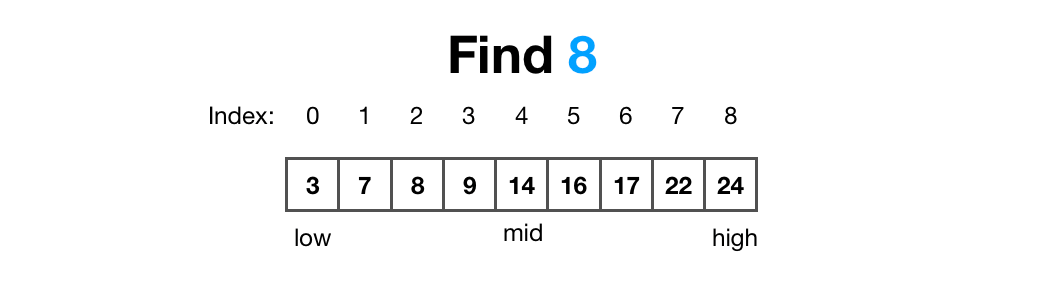
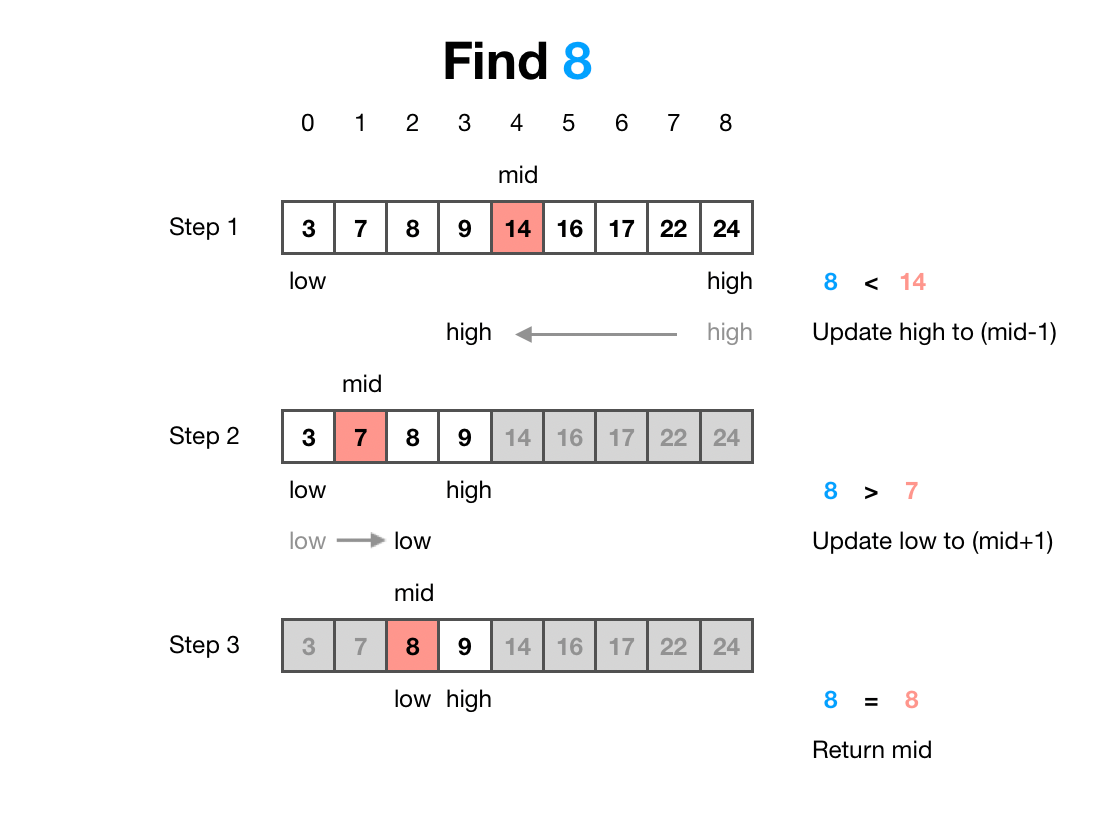
Let’s walk through the Binary Search algorithm with an example. In the below image, you can see a sorted array nums = [3, 7, 8, 9, 14, 16, 17, 22, 24] with n = 9 elements. We want to find the position of target = 8.
Iteration 1:
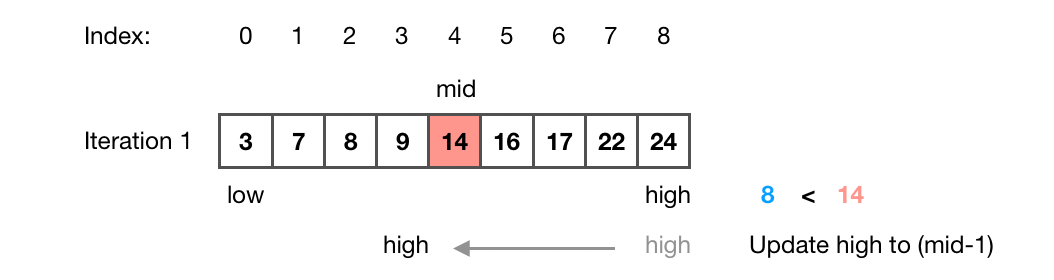
We define the search space by its start and end indices called low and high. We set the search space by assigning the low to the index of the first element in the array (0) and the high to the index of the last element in the array (8).
We get the index of the middle element of the array mid by using the formula (low + high)//2. This operation performs a floor function to achieve the desired middle element: mid = (low + high) // 2 = (0 + 8) / 2 = 4
The value of the middle element is nums[mid] = nums[4] = 14 and therefore greater than target = 8. Thus, all elements to the right side of the middle element can be discarded. We halve the search space by updating high to (mid -- 1) = 4 -- 1 = 3.
Iteration 2:
Now, we repeat step 2.
The index of the middle element of the array is now mid = (low + high) // 2 = (0 + 3) / 2 = 1. The value of the middle element is nums[mid] = nums[1] = 7 and therefore smaller than target = 8. Thus, all elements to the left side of the middle element can be discarded. We halve the search space by updating low to (mid + 1) = 1 + 1 = 2.
Iteration 3:
Again, we repeat step 2.
The index of the middle element of the array is now mid = (low + high) // 2 = (1 + 3) / 2 = 2.
The value of the middle element is nums[mid] = nums[2] = 8and therefore equal to target = 8. We return mid = 2 as the target’s position and terminate the function.
Implementation
In this section, you’ll see the most elementary implementation of the Binary Search algorithm in Python and C++. We’ll also look at built-in Binary Search functions in Python and C++.
There are different implementations of the binary search algorithm [4]. However, this article will only discuss the elementary iterative implementation, which is also the most common implementation.
Python
The Python implementation looks as shown below:
Binary Search Algorithm implemented in Python
Instead of writing your own Binary Search function, you can use the bisect_left() function from the bisect module in Python [5].
from bisect import bisect_lefti = bisect_left(target, nums)C++
The C++ implementation looks as shown below:
Binary Search Algorithm implemented in C++
In C++ the Standard Template Library (STL) provides the function lower_bound(), which can be used as shown in the following example [2]. There’s also the function binary_search(), which returns a boolean whether the target exists in the sorted array or not but not its position [1].
#include <algorithm>i = std::lower_bound(nums.begin(), nums.end(), target);Discussion
The Binary Search algorithm’s time and space complexity are:
- time complexity is logarithmic with O(log n) [6]. If n is the length of the input array, the Binary Search algorithm’s worst-case time complexity is O(log n) because it’s performed by halving the search space at each iteration. E.g., if we wanted to find an element in an array of length 8, it would take log₂(8) = 3 iterations in the worst-case scenario.
- space complexity is constant with O(1). Since the algorithm needs space for the three indices,
mid,low, andhighbut no additional space for each iteration.
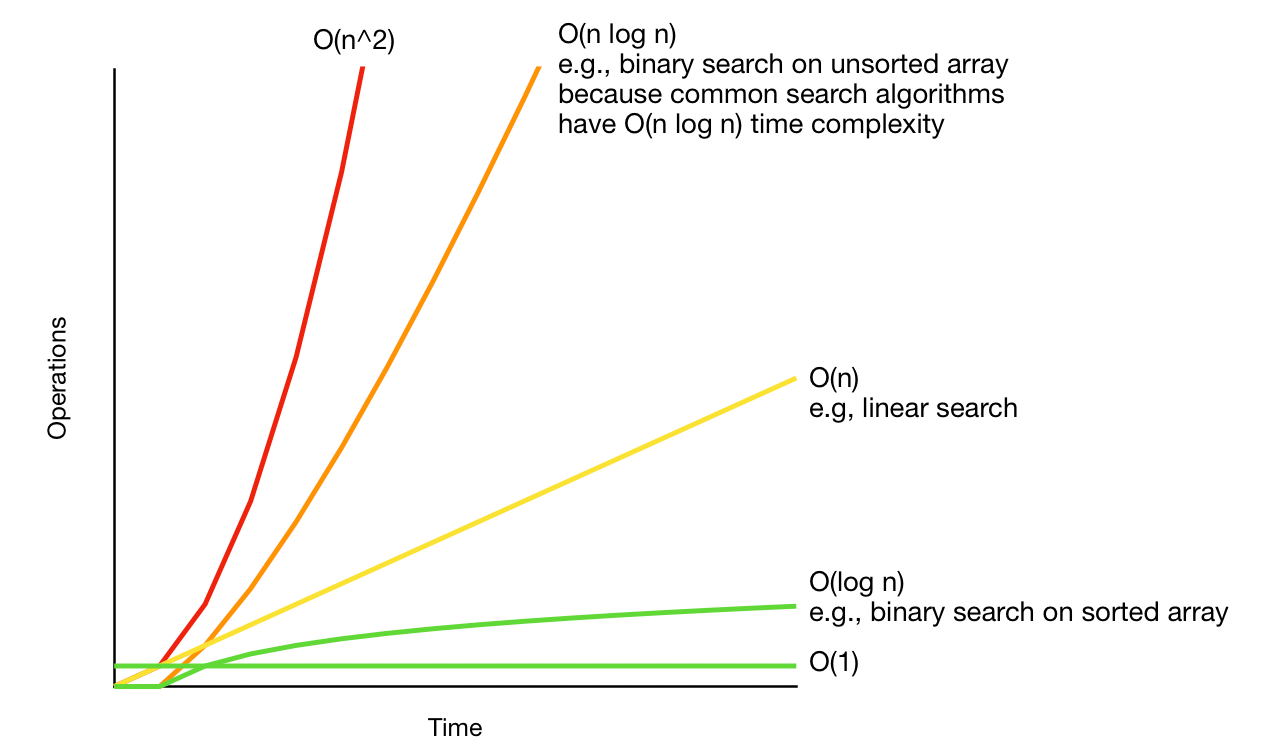
The main advantage of the Binary Search algorithm is its speed compared to the Linear Search algorithm. Because the concept of the Linear Search algorithm is to iterate through the array until the target element is found – just like starting on the first page of an English dictionary to look up a specific word – the Linear Search algorithm’s time complexity is linear with O(n).
E.g., if we wanted to find an element in the array from the previous example of length eight, it would take n = 8 iterations in the worst-case scenario. It would take only three iterations with the Binary Search algorithm.
However, the main disadvantage of the Binary Search algorithm is that it requires a sorted array to discard half of the search space at each iteration. Although an array can be sorted before running the Binary Search algorithm, the sorting algorithm will increase the overall time complexity. In general, sorting has a time complexity of O(n log n), which is worse than the linear time complexity of the Linear Search algorithm.
Below, you can see the time complexities of the Binary Search algorithm, the Linear Search algorithm, and the Binary Search algorithm with additional sorting as a preprocessing step:
Conclusion
The best approach to developing an algorithm is to break down the problem into algorithms you already know how to solve, like searching and sorting. That’s why understanding the Binary Search Algorithm can help you write better algorithms – whether you are a Software Engineer, Data Scientist, or anyone else developing algorithms.
Understanding the Binary Search Algorithm can help you write better algorithms – whether you are a Software Engineer, Data Scientist, or anyone else
This article explained how the Binary Search algorithm works. The algorithm finds an element in a sorted list. Because the search space is sorted, the algorithm discards half of the search space after each iteration. Thus, we halve the search space until we find the target element. You can see a visual summary of the algorithm below.
The Binary Search algorithm is more efficient than the Linear Search algorithm on sorted lists. It has a logarithmic time complexity and constant space complexity.
References
[1] “C++ reference”, “std::binary_search.” cppreference.com. https://en.cppreference.com/w/cpp/algorithm/binary_search (accessed July 2, 2022)
[2] “C++ reference”, “std::lower_bound.” cppreference.com. https://en.cppreference.com/w/cpp/algorithm/lower_bound (accessed July 2, 2022)
[3] Leetcode, “704. Binary Search.” leetcode.com. https://leetcode.com/problems/binary-search/ (accessed July 2, 2022)
[4] Leetcode, “Learning about Binary Search”. leetcode.com. https://leetcode.com/explore/learn/card/binary-search/ (accessed July 2, 2022)
[5] “Python”, “bisect – Array bisection algorithm.” python.org. https://docs.python.org/3/library/string.html#formatspec (accessed July 2, 2022)
[6] S. Selkow, G. T. Heineman, G. Pollice, Algorithms in a Nutshell (2008), O’Reilly Media.
[7] M. Buss, “Divide and Conquer with Binary Search in Swift”, mikebuss.com. https://mikebuss.com/2016/04/21/binary-search/ (accessed July 2, 2022)
[8] “Big-O Cheat Sheet”, “Know Thy Complexities!”, bigocheatsheet.com. https://www.bigocheatsheet.com/ (accessed July 2, 2022)
This blog was originally published on Towards Data Science on Sep 27, 2022 and moved to this site on Feb 1, 2026.